
User guide







4
©
2014 DJI. All Rights Reserved.
In the Box
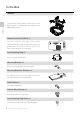
Gimbal×1
The Z15-5D III (HD) gimbal includes built-in servo
drive modules, an independent IMU module and a
HDMI-HD/AV module.
Gimbal Control Unit (GCU) ×1
Connect the GCU to your flight control system
using the CAN-Bus cable. The GCU will control the
gimbal’s pan, roll and tilt movements. Connect the
GCU to video downlink for video signal.
5D
GCUGCU
ROLL
TILT
PAN
MODE
SHUT
AUX1
AUX2
AUX3
Lens Retaining Ring ×1
For mounting the camera lens.
Mounting Bracket ×4
For mounting the gimbal to the landing gear.
Mounting Board for Receiver ×1
For attaching the GCU and providing a convenient
mount for the receiver or other devices.
Cable Clamp ×1
For cable management.
Camera Mount Screw ×2
A standard tripod mounting screw.
Lens Retaining Ring Screw ×1
For attaching the lens retaining ring to the gimbal.
In the Box