
User guide





Zenmuse Z15-5D III
(
HD
)
User Manual
24
©
2014 DJI. All Rights Reserved.
Port Descriptions
GCU
ROLL For roll axis control
TILT For tilt axis control
PAN For pan axis control
MODE For Working Mode switch
SHUT For camera shutter control and auto-calibration function
AUX1 For the 360° panoramic photograph function
AUX2 For Gimbal Orientation (down or forward) switch in FPV Mode ; S-Bus Receiver
AUX3 For the video recording control ; PPM Receiver
G7
1.
Connect to the wireless video transmission module, for transmitting AV or HD signals
2.
Connect to DJI Lightbridge, for transmitting HD, gimbal and aircraft control signals
XT60 Connect to the battery (or to GIMBAL if DJI S1000 is used)
G6 Connect to Gimbal, for transmitting motor commands
G9 Connect to Gimbal, for transmitting the video signal
Micro-USB port: for PC connection (Assistant conguration and rmware upgrades)
CAN-Bus port: Use CAN-Bus Cable to connect GCU to the ight control system
Gimbal
HDMI-HD/AV Port To Camera HDMI port
Motor Command Input Port To GCU G6
10-Pin to 9-Pin Cable Port To GCU G9
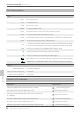
Gimbal LED Indicator
Description LED Indicator
HD mode, HDMI-HD/AV module transmits normally
LED is blinking green.
HD mode, without camera HDMI video input
Green LED is solid on.
HD mode, DJI Lightbridge App video source has been set
to “HDMI/AV”
Yellow LED is solid on.
AV mode, HDMI-HD/AV module transmits normally
LED is blinking yellow.
AV mode, without camera HDMI video input
Yellow LED is solid on.
HD video transmission module and gimbal is disconnected
LED is blinking red.
Appendix