
Operation Manual


Table Of Contents
8
©
2014 DJI. All Rights Reserved.
Gimbal Description
Getting Started
Smart Battery
Before you start using your Ronin, be sure to charge the battery rst. The smart battery is specially
designed for the Ronin. It has a battery capacity of 3400mAh, voltage of 14.8V, and power
management functionality. Charge the smart battery only with DJI approved chargers. When the
battery is fully charged, it has a maximum run time of 4 hours.
Smart Battery Charger
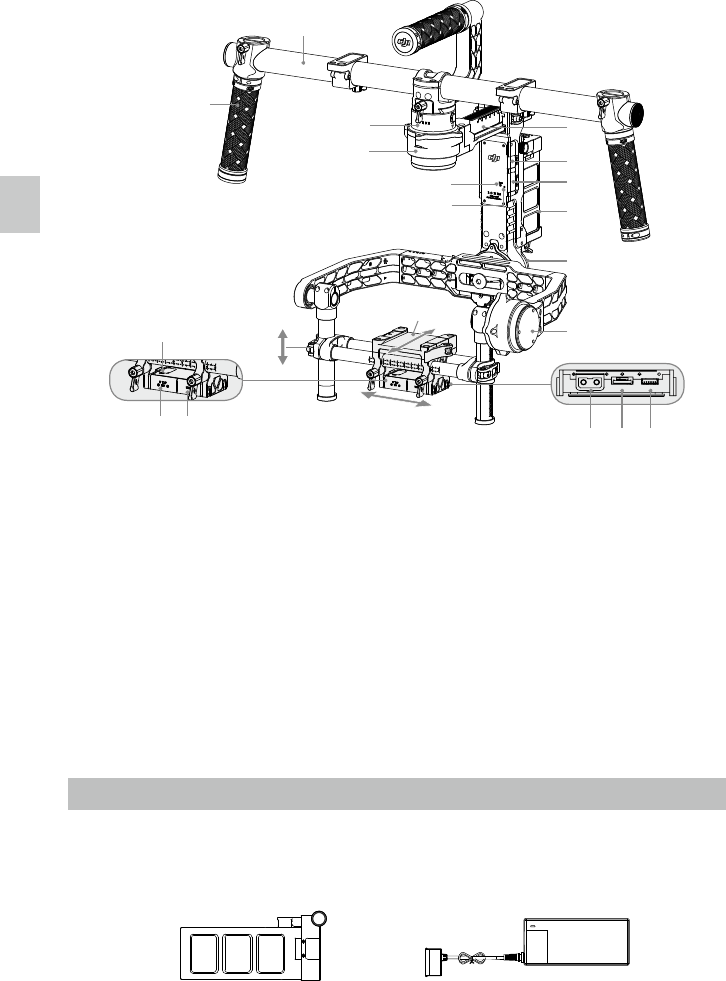
[1] Top Handle Bar
[2] Side Handle
[3] Quick Release Mount
[4] Pan Motor
[5] Pan Adjustment Slider
[6] D-BUS Receiver Port
[7] USB Port & CAN Bus Port
[8] Bind Button
[9] Gimbal LED Indicator Light
[10] Smart Battery
[11] Roll Motor
[12] Tilt Motor
[13] Fore and Aft Adjustment
[14] Tilt Vertical Adjustment
[15] Roll Adjustment
[16] IMU Port
[17] P-TAP Accessory Power Port
[18] USB Accessory Power Port
[19] P-TAP Port (rear side)
[20] DJI Lightbridge Port (rear side)
[21] GCU
Port (rear side)
[
1
]
[
2
]
[
4
]
[
3
]
[
8
]
[
9
]
[
5
]
[
6
]
[
7
]
[
10
]
[
11
]
[
12
]
[
14
]
[
15
]
[
13
]
[
16
]
[
17
]
[
18
]
[
19
] [
20
]
[
21
]
Gimbal Description / Getting Started