
FPV DJI Motion Controller User Guide







9
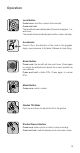
Lock Button
Press twice: start the motors of the aircraft.
Press and hold:
The aircraft will automatically take o, ascend to approx. 1 m,
and hover.
The aircraft will automatically land and the motors will stop.
Brake Button
Press once: the aircraft will stop and hover. Press again
to unlock the attitude and record the current position as
zero attitude.
Press and hold: initiate RTH. Press again to cancel
RTH.
Mode Button
Press once: switch modes.
Gimbal Tilt Slider
Push up and down to adjust the tilt of the gimbal.
Shutter/Record Button
Press once: take a photo or start or stop recording.
Press and hold: switch between photo and video mode.
Accelerator
Press to y in the direction of the circle in the goggles.
Apply more pressure to y faster. Release to stop ying.
Operation