Motion Controller User Guide 使用说明 使用說明 ユーザーガイド 사용자 가이드 Bedienungsanleitung Guía de usuario Guide de l'utilisateur Guida dell'utente Gebruiksaanwijzing Manual do utilizador Guia do usuário Руководство пользователя v1.2 2021.
1 www.dji.
EN Check battery level: press once. Power on/off: press then press and hold. CHS 检查电量:短按一次。 开机 / 关机:短按一次,再长按 2 秒。 CHT 檢查電量:短按一次。 開機 / 關機:短按一次,再長按 2 秒。 JP バッテリー残量確認:1 回押す。 電源をオン/オフ:1 回押して、長押し。 KR 배터리 잔량 확인 : 한 번 누르기 전원 켜기 / 끄기 : 한번 누르고 다시 길게 누르기 DE Einmal drücken: Akkustand überprüfen. Ein-/auszuschalten: Kurz drücken, dann nochmals drücken und gedrückt halten. ES Comprobar nivel de batería: presione una vez. Encender/apagar: pulse, vuelva a pulsar y mantenga pulsado.
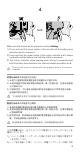
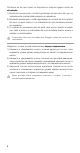
2s 2s Make sure that all devices are powered on before linking. 1) Press and hold the power button of the aircraft until the battery level indicators blink in sequence. 2) Press and hold the power button of the motion controller until it beeps continually and the battery level indicators blink in sequence. 3) The motion controller stops beeping when linking is successful and both the battery level indicators turn solid and display the battery level.
するまで、モーションコントローラーの電源ボタンを長押しします。 3) リンク作業が正常に終了し、両方のバッテリー残量インジケーター が点灯してバッテリー残量が表示されると、モーションコントロー ラーのビープ音は止まります。 モーションコントローラーとのリンク作業の前に、機体とゴーグルを リンクしておく必要があります。 연동 전 , 모든 기기의 전원이 켜졌는지 확인해야 합니다 . 1) 배터리 잔량 표시기가 순차적으로 깜박일 때까지 기체의 전원 버튼을 길게 누릅 니다 . 2) 모션 컨트롤러가 계속해서 신호음을 내고 배터리 잔량 표시기가 순차적으로 깜 박일 때까지 모션 컨트롤러의 전원 버튼을 길게 누릅니다 . 3) 성공적으로 연동되면 모션 컨트롤러가 깜박임을 중단하고 두 배터리 잔량 표시 기가 모두 켜지며 배터리 잔량을 표시합니다 . 기체를 고글과 먼저 연동한 후 모션 컨트롤러와 연동해야 합니다 .
les indicateurs de niveau de batterie clignotent en séquence. 2) Maintenez le bouton d'alimentation de lu contrôleur de mouvements enfoncé jusqu’à ce qu’il émette un bip continu et que les indicateurs de niveau de batterie clignotent en séquence. 3) Le contrôleur de mouvements arrête de biper quand il est correctement appairé et que les indicateurs du niveau de batterie brillent de façon continue et affiche le niveau de batterie. L’appareil doit être appairé au casque avant le contrôleur de mouvements.
Certifique-se de que todos os dispositivos estejam ligados antes da vinculação. 1) Mantenha pressionado o botão liga/desliga da aeronave até que os indicadores de nível da bateria pisquem em sequência. 2) Mantenha pressionado o botão liga/desliga do controle de movimentos até ouvir um bipe contínuo e os indicadores de nível da bateria piscarem em sequência.
5 DJI Fly App Connect the USB-C port of the goggles to the mobile device, run DJI Fly, and follow the prompts to activate the Motion Controller. 连接飞行眼镜的 USB-C 接口至手机,运行 DJI Fly App 并根据 App 提示 激活穿越摇杆。 將飛行眼鏡的 USB-C 埠與手機連接,執行 DJI Fly 應用程式,並根據應用 程式的提示啟動穿越搖桿。 ゴーグルの USB-C ポートとモバイル端末を接続し、DJI Fly を起動し、 プロンプトに従って、モーションコントローラーのアクティベーション を行います。 고글의 USB-C 포트를 모바일 기기에 연결하고 , DJI Fly 를 실행한 다음 알림 메시 지에 따라 모션 컨트롤러를 활성화합니다 .
6 OR Normal Mode / 普通挡 / 普通檔 / ノーマルモード / 일반모드 / Normalmodus / Modo Normal / Mode Normal / Modalità Normale / Normale stand / Modo Normal / Modo Normal / Обычный режим 8
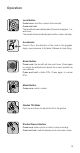
Operation Lock Button Press twice: start the motors of the aircraft. Press and hold: The aircraft will automatically take off, ascend to approx. 1 m, and hover. The aircraft will automatically land and the motors will stop. Accelerator Press to fly in the direction of the circle in the goggles. Apply more pressure to fly faster. Release to stop flying. Brake Button Press once: the aircraft will stop and hover. Press again to unlock the attitude and record the current position as zero attitude.
操 作 Lock 按键 双击:启动飞行器电机。 长按: 飞行器自动起飞至约 1 m 并悬停。 飞行器自动降落至地面并停止电机。 油门扳机 按下油门扳机可控制飞行器向飞行眼镜上圆圈的位置前 进。增加按压力度可增大飞行速度,松开即停止前进。 急停按键 短按:飞行器紧急刹车并悬停。再短按一次取消姿态固 定并以穿越摇杆此位置为姿态零位。 长按:启动智能返航。再短按一次取消智能返航。 挡位按键 短按:切换挡位。 云台俯仰滑杆 拨动控制云台俯仰。 拍摄按键 短按:拍摄照片或启动 / 停止录像。 长按:切换拍照 / 录像模式。 10
操 作 Lock 按鈕 連按兩下:啟動航拍機馬達。 長按: 航拍機自動起飛至約 1 公尺並懸停。 航拍機自動降落至地面並停止馬達。 油門板機 按下油門板機可以控制航拍機向飛行眼鏡上的圓圈位置 前進。增加按壓力度可增大飛行速度,鬆開即停止前進。 急停按鈕 短按:航拍機緊急煞車並懸停。再短按一次即取消姿態 固定,並以穿越搖桿目前位置為姿態零位。 長按:啟動智能返航。再短按一次即可取消智能返航。 檔位按鈕 短按:切換檔位。 雲台俯仰滑桿 撥動即可控制雲台俯仰。 拍攝按鈕 短按:拍攝照片或啟動 / 停止錄影。 長按:切換拍照 / 錄影模式。 11
操作 ロックボタン 2 回押す:機体のモーターを起動します。 長押し: 機体は自動で離陸したあと、約 1 m まで上昇し、ホバ リングします。 機体は自動で着陸し、モーターは停止します。 アクセル 押すと、ゴーグル上でサークルが表示されている方向 へ飛行します。さらに奥まで押すと加速します。離す と飛行を停止します。 ブレーキボタン 1 回押す:機体は停止し、ホバリングします。(機体 はモーションコントローラーの動作をフォローしませ ん。(姿勢ロック)) もう 1 回押すと、ブレーキは 解除されます。(姿勢ロックが解除され、現在のモー ションコントローラー姿勢をゼロ姿勢として記録。) 長押し:RTH を起動します。再度押すと、RTH はキ ャンセルされます。 モードボタン 1 回押す:モードを切り替えます。 ジンバル チルトスライダー 上下にスライドさせ、ジンバルのチルトを調整します。 シャッター/録画ボタン 1 回押す:写真を撮影する、もしくは録画を開始また は停止します。 長押し:写真モードと動画モードを切り替えます。 12
조작 잠금 버튼 2 번 누르기 : 기체 모터 시동 걸기 . 길게 누르기 : 기체가 자동으로 이륙하며 , 약 1m 위로 상승하고 호버링합 니다 . 기체 자동으로 착륙 및 모터 정지 . 액셀러레이터 눌러서 고글의 원 방향으로 비행 . 세게 누를수록 속도 증가 . 손을 떼면 비행 정지 . 제동 버튼 1 번 누르기 : 기체 비행 정지하고 호버링 . 다시 한 번 누르면 , 자세 잠금 해제 및 현재 포지션을 0 자세로 기록 . 길게 누르기 : RTH 시작 . 다시 누르면 RTH 취소 . 모드 버튼 1 번 누르기 : 모드 전환 . 짐벌 틸트 슬라이더 위 / 아래로 눌러 짐벌의 틸트 조정 . 셔터 / 녹화 버튼 1 번 누르기 : 사진 촬영 또는 동영상 촬영 시작 / 정지 . 길게 누르기 : 사진 및 동영상 모드 간 전환 .
Bedienung Sperr-Taste Zweimal drücken: Startet die Motoren des Fluggeräts. Drücken und gedrückt halten: Das Fluggerät hebt automatisch ab, steigt auf ca. 1 m auf und schwebt. Das Fluggerät landet automatisch und die Motoren stoppen. Beschleunigungs-Taste Drücken, um zu Beschleunigen. Die Richtung wird durch den Kreis vorgegeben, der in den Goggles angezeigt wird. Erhöhe den Druck auf die Taste, um schneller zu fliegen. Loslassen, um zu stoppen.
Funcionamiento Botón de bloqueo Presione dos veces: los motores de la aeronave se iniciarán. Presione y mantenga presionado: La aeronave despegará automáticamente, ascenderá aprox. 1 m y realizará vuelo estacionario. La aeronave aterrizará automáticamente y los motores se detendrán. Acelerador Presione para volar en la dirección del círculo en las gafas. Aplique más presión para volar más rápido. Suelte para detener el vuelo.
Fonctionnement Bouton de verrou Appuyez deux fois : démarre les moteurs de l’appareil. Appuyez et maintenez : I’appareil décolle automatiquement, s’élève à 1 mètre environ et vole en stationnaire. I’appareil atterrit automatiquement et les moteurs s’arrêtent. Accélérateur Appuyez pour voler en direction du cercle dans le casque. Appuyez plus fortement pour voler plus vite. Relâchez pour arrêter de voler. Bouton de freinage Appuyez une fois : l’appareil s’arrête et vole en stationnaire.
Funzionamento Pulsante di blocco Premi due volte: avviare i motori del velivolo. Premi e tieni premuto: il drone decollerà automaticamente a circa 1 m di altezza e stazionerà in volo. il drone atterrerà automaticamente e i motori si arresteranno. Acceleratore Premere per volare nella direzione della figura sferica nel visore. Applica più pressione per volare più velocemente. Rilascia per fermarti. Pulsante del freno Premi una volta: il drone si arresterà e stazionerà in volo.
Bediening Vergrendelknop Twee keer drukken: start de motoren van de drone. Ingedrukt houden: De drone zal automatisch opstijgen tot ca. 1 m, en zweven. De drone zal automatisch landen en de motoren zullen stoppen. Accelerator Druk hierop om in de richting van de cirkel in de bril te vliegen. Voer meer druk uit om sneller te vliegen. Laat los om te stoppen met vliegen. Remknop Eén keer drukken: de drone stopt en gaat zweven.
Funcionamento Botão de Bloqueio Premir duas vezes: iniciar os motores da aeronave. Premir e manter premido: A aeronave irá descolar automaticamente, ascender a, aprox., 1 m e pairar. A aeronave irá aterrar automaticamente e os motores irão parar. Acelerador Prima para voar na direção do círculo nos goggles. Aplique mais pressão para voar mais rapidamente. Liberte para parar de voar. Botão de Travão Premir uma vez: a aeronave irá parar e pairar.
Operação Botão de trava Pressionar duas vezes: liga os motores da aeronave. Pressionar e segurar: A a e ro n a v e d e c o l a a u t o m a t i c a m e n t e , s o b e a aproximadamente 1 metro e faz voo estacionário. A aeronave pousa automaticamente e os motores são interrompidos. Acelerador Pressione-o para voar em direção ao círculo nos Goggles. Faça mais pressão para voar mais rápido. Libere para interromper o voo. Botão de freio Pressione uma vez: a aeronave para e faz voo estacionário.
Эксплуатация Кнопка блокировки Нажмите дважды, чтобы запустить моторы дрона. Нажмите и удерживайте: Дрон автоматически взлетит, поднимется примерно до 1 м и зависнет. дрон автоматически совершит посадку, а моторы остановятся. Ускоритель Нажмите, чтобы лететь в направлении круга в очках. Нажимайте сильнее, чтобы увеличить скорость. Отпустите, чтобы остановить полет. Кнопка тормоза Нажмите, чтобы дрон остановился и завис в воздухе.
EN Disclaimer and Warning Please read this entire document and all safe and lawful practices DJITM provided carefully before use. Failure to read and follow instructions and warnings may result in serious injury to yourself or others, damage to your DJI product, or damage to other objects in the vicinity. By using this product, you hereby signify that you have read this disclaimer and warning carefully and that you understand and agree to abide by the terms and conditions herein.
Please refer to http://www.dji.com/service for after-sales service for your product where applicable. DJI shall mean SZ DJI TECHNOLOGY CO., LTD. and/or its affiliated companies where applicable.
CHT 免責聲明和警告 使用本産品之前,請仔細閱讀並遵循本文及大疆 TM 創新(DJITM)提供的 所有安全指南,否則可能會給您和周圍的人帶來傷害,損壞本産品或其它 周圍物品。一旦使用本產品,即視為您已經仔細閱讀本文件,理解、認可 和接受本聲明全部條款和內容。您承諾對使用本產品以及可能帶來的後果 負全部責任。大疆創新(DJI)對於直接或間接使用本產品而造成的損壞、 傷害及任何法律責任概不負責。 DJI 是深圳市大疆創新科技有限公司及其附屬公司的商標。本文出現的産 品名稱、品牌等,均為其所屬公司的商標。本產品及手冊之版權為大疆創 新所有。未經許可,不得以任何形式複製翻印。 本文件及本產品所有相關文件的最終解釋權歸大疆創新(DJI)所有。如 有更新,恕不另行通知。請前往 www.dji.com 官方網站以取得最新的產品 資訊。 簡介 將 DJI 穿越搖桿搭配 DJI FPV 飛行眼鏡 V2,透過體感即可輕鬆控制航拍 機飛行,並提供全新、便捷的飛行操控體驗。 使用說明 前往 http://www.dji.
かった場合、ご自身や他の人に重傷を負わせたり、またはお客様の DJI 製品および周辺の他の物の破損につながる恐れがあります。本製品を 使用することにより、本書の免責事項および警告をよく読み、記載さ れている利用規約を理解し、順守することに同意したとみなされます。 本製品の使用中の行動とこれに伴う結果には、ユーザーが全面的に責 任を負うことに同意するものとします。本製品の使用により直接また は間接的に発生する損害、傷害、およびその他法的責任に対して、DJI は一切責任を負いません。 DJI は SZ DJI TECHNOLOGY CO., LTD.
http://www.dji.com/service を参照してください。 DJI は、SZ DJI TECHNOLOGY CO., LTD. および/または該当する場合は その関連会社を表し。 KR 고지 사항 및 경고 DJITM 에서 제공해드리는 본 문서 전문과 안전하고 적법한 사용 방법 관련된 모든 내용을 사용 전에 주의 깊게 읽어 주십시오 . 지침 및 경고 사항을 읽고 따르지 않을 경우 사용자 또는 다른 사람이 심각하게 다치거나 DJI 제품 또는 근처에 있는 다른 물체가 손상될 수 있습니다 . 제품을 사용하는 것은 본 고지 사항 및 경고를 주의 깊 게 읽었으며 명시된 약관을 이해하고 준수하기로 동의한 것으로 간주합니다 . 본 제 품 사용 시 사용자의 행위와 그에 따른 결과에 대한 책임은 전적으로 본인에게 있 다는 것에 동의합니다 . DJI 는 본 제품의 사용으로 인해 직접 또는 간접적으로 발 생한 피해 , 부상 또는 모든 법적 책임에 대해 어떠한 책임도 지지 않습니다 .
작동 온도 범위 -10~40 ° C 최대 작동 시간 5 시간 해당 제품의 적용 가능한 A/S 서비스는 http://www.dji.com/service 를 참조하십 시오 . DJI 는 SZ DJI TECHNOLOGY CO., LTD. 및 / 또는 해당 자회사를 의미합니다 . DE Haftungsausschluss und Warnhinweis Bitte lesen Sie vor der Verwendung dieses gesamte Dokument und alle von DJITM zur Verfügung gestellten sicheren und rechtmäßigen Praktiken sorgfältig durch. Die Nichtbeachtung der Anweisungen und Warnungen kann zu schweren Verletzungen für Sie oder andere Personen bzw.
Verwendung Besuch http://www.dji.com/dji-fpv (Benutzerhandbuch für DJI Bewegungssteuereinheit), um mehr über dieses Produkt zu erfahren. Technische Daten Modell FC7BMC Gewicht 167 g Betriebsfrequenzbereich 2,400 – 2,4835 GHz; 5,725 – 5,850 GHz Max.
Este documento y el resto de documentos colaterales están sujetos a cambios a entera discreción de DJI. Para obtener información actualizada sobre el producto, visite http://www.dji.com y haga clic en la página de este producto. Esta renuncia está disponible en diversos idiomas. En caso de divergencia entre las diferentes versiones, prevalecerá la versión en inglés.
vous-même à des blessures graves et risquez d’endommager votre produit DJI ou d’autres objets placés à proximité. En utilisant ce produit, vous confirmez que vous avez lu attentivement la clause d’exclusion de responsabilité et la mise en garde, que vous comprenez les conditions générales qui y sont énoncées, et que vous acceptez de les respecter. Vous déclarez assumer l’entière responsabilité de votre comportement lors de l’utilisation du produit ainsi que toutes les conséquences qui en découlent.
Puissance de l’émetteur (EIRP) 2,4 GHz : ≤28,5 dBm (FCC), ≤20 dBm (CE/ SRRC/MIC) 5,8 GHz : ≤31,5 dBm (FCC), ≤19 dBm (SRRC), ≤14 dBm (CE) Plage de températures de fonctionnement -10 ° à 40 °C (14° to 104° F) Autonomie max. 5 heures Consultez la page http://www.dji.com/service pour bénéficier du service après-vente pour votre produit, le cas échéant. DJI signifie SZ DJI TECHNOLOGY CO., LTD. et/ou ses sociétés affiliées le cas échéant.
Utilizzo Visita http://www.dji.com/dji-fpv (Manuale utente di DJI Motion Controller) per saperne di più su come utilizzare questo prodotto. Specifiche tecniche Modello FC7BMC Peso 167 g Frequenza operativa 2.400-2.4835 GHz; 5.725-5.850 GHz Massima distanza di trasmissione (senza ostacoli né interferenze) 10 km (FCC); 6 km (CE/SRRC/MIC) Potenza del trasmettitore (EIRP) 2.4 GHz: ≤28.5 dBm (FCC), ≤20 dBm (CE/ SRRC/MIC) 5.8 GHz: ≤31.
DJI gewijzigd worden. Ga voor actuele productinformatie naar http://www. dji.com en klik op de productpagina van dit product. Deze disclaimer is in verschillende talen beschikbaar. In geval van verschillen tussen verschillende versies, geldt de Engelse versie. Inleiding Bij gebruik met de DJI FPV V2-bril biedt de DJI Motion Controller een meeslepende en intuïtieve vliegervaring die gebruikers in staat stelt om de drone gemakkelijk te besturen door hun handbewegingen te volgen. Gebruik Bezoek http://www.
é o único responsável pela sua conduta durante a utilização deste produto e pelas possíveis consequências daí resultantes. A DJI não assume qualquer responsabilidade pelos danos ou ferimentos ou quaisquer responsabilidades legais decorrentes direta ou indiretamente da utilização deste produto. A DJI é uma marca comercial da SZ DJI TECHNOLOGY CO., LTD. (abreviada como "DJI") e das respetivas empresas afiliadas. Todos os nomes de produtos, marcas, etc.
Consulte http://www.dji.com/service para obter assistência pós-venda para o seu produto, conforme aplicável. DJI significa SZ DJI TECHNOLOGY CO., LTD. e/ou as suas empresas afiliadas, conforme aplicável. PT-BR Isenção de Responsabilidade e Advertência Leia este documento por inteiro e todas as práticas legais e seguras que a DJITM forneceu cuidadosamente antes de usar seu dispositivo.
Especificações Modelo FC7BMC Peso 167 g Alcance da frequência de funcionamento 2,400 – 2,4835 GHz; 5,725 – 5,850 GHz Distância máx. de transmissão 10 km (FCC); 6 km (CE/SRRC/MIC) (sem obstrução, sem interferência) Potência do transmissor (EIRP) 2,4 GHz: ≤28,5 dBm (FCC), ≤20 dBm (CE/ SRRC/MIC) 5,8 GHz: ≤31,5 dBm (FCC), ≤19 dBm (SRRC), ≤14 dBm (CE) Alcance da temperatura de funcionamento -10° a 40 °C Tempo máx. de operação 5 horas Consulte http://www.dji.
Компания DJI вправе единолично вносить изменения в содержание данного и всех сопутствующих документов. Для получения обновленной информации о продукте посетите сайт http://www.dji.com и выберите страницу, соответствующую данному продукту. Этот отказ от ответственности доступен на нескольких языках. В случае расхождения между различными версиями преимущественную силу имеет версия на английском языке.
—Increase the separation between the equipment and receiver. —Connect the equipment into an outlet on a circuit different from that to which the receiver is connected. —Consult the dealer or an experienced radio/TV technician for help. This equipment complies with FCC radiation exposure limits set forth for an uncontrolled environment. End user must follow the specific operating instructions for satisfying RF exposure compliance.
A copy of the GB Declarationof Conformity is available online at www.dji.com/eurocompliance. Declaración de cumplimiento UE: SZ DJI TECHNOLOGY CO., LTD. por la presente declara que este dispositivo cumple los requisitos básicos y el resto de provisiones relevantes de la Directiva 2014/53/EU. Hay disponible online una copia de la Declaración de conformidad UE en www.dji.
i ostalim relevantnim odredbama Direktive 2014/53/EU. Kopija EU Izjave o sukladnosti dostupna je na mrežnoj stranici www.dji.com/euro-compliance Adresa EU kontakta: DJI GmbH, Industriestrasse 12 97618, Niederlauer, Njemačka Vyhlásenie o zhode EÚ: SZ DJI Technology Co., Ltd. týmto vyhlasuje, že toto zariadenie je v zhode so základnými požiadavkami a ďalšími relevantnými ustanoveniami smernice 2014/53/EÚ. Kópia tohto Vyhlásenia o zhode EÚ je k dispozícii online na www.dji.
kaasa väärtusliku toorme ringlussevõtule ja mürgiste ainete töötlemisele. Utilizavimas nekenkiant aplinkai Senų elektrinių prietaisų negalima išmesti kartu su buitinėmis atliekomis; juos būtina utilizuoti atskirai. Tokių prietaisų utilizavimas per komunalinius atliekų surinkimo punktus yra nemokamas. Elektrinių prietaisų savininkai utilizuojamus prietaisus privalo priduoti į atitinkamus arba analogiškus atliekų surinkimo punktus.
WE ARE HERE FOR YOU 在线技术支持 Contact DJI SUPPORT via Facebook Messenger 微信扫一扫 获取技术支持 SUBSCRIBE FOR MORE INFORMATION 关注 DJI 大疆创新及时获取最新资讯 www.dji.com/dji-fpv/downloads DJI is a trademark of DJI. Copyright © 2021 DJI All Rights Reserved. Printed in China.