
User Manual-inspire 2

©
2016 DJI. All Rights Reserved.
7
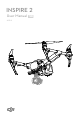
INSPIRE 2
User Manual
Battery must be fully charged before using it for the first time. Refer to "Charging the
Intelligent Flight Battery" for more information .
The aircraft cannot change to Landing Mode from Travel Mode with the gimbal camera
attached.
Place the aircraft on the smooth and reective surface (e.g. table or tile) before switching between
the travel modes to the landing mode.
Keep your hands away from the transformation mechanism when unfolding the landing gear.
Make sure to press the battery remove button when removing the battery.
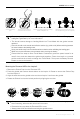
Please follow the steps to enter Travel Mode: Continuously press the power button for at
least 5 times, and then detach the gimbal and propellers. Place the aircraft on a smooth
surface and wait the aircraft to change into Travel Mode. Then press the Battery Remove
Button to remove the batteries.
Always ensure that the DJI Gimbal Connector 2.0 on the Inspire 2 is in the right position
when mounting, otherwise the camera will not mount.
Remove the lens cap when the Zenmuse X5S is in use.
Always power off the aircraft before removing the gimbal camera.
Press the power button
a minimum of ve times
Unfold the landing gear to Landing
Mode and power on
Insert the battery
pair
5 x
Mounting the Zenmuse X5S to the
aircraft (Powering off not required)
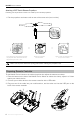
Mounting the Zenmuse X5S to the Inspire 2
1. Remove the Gimbal Cap from the Zenmuse X5S.
2. Press the gimbal and camera release button on the Inspire 2. Rotate to remove the Gimbal Cap
from the Inspire 2.
3. Align the white dot on the gimbal to the red dot on Inspire 2 and insert the gimbal.
4. Rotate the Gimbal Lock to the locked position by aligning the red dots.
2
3
4
11