
User Manual-inspire 2



48
©
2016 DJI. All Rights Reserved.
INSPIRE 2
User Manual
12
R
09:29
AE
P-GPS
AF/ MF
ISO
SHU T TER
EV
200 0.3
F
5.61/200
CAPACITY
4KP3020:12 384G
SD TIME
4KP30
74%
70%
4.07V
4.07V
H
10.0
MD
30
M
VS 2.0M/S VPS 2.0MH.S 10.0 KM/H
In Flight (GPS)
5000K
WB
Custom
Pitch Pan
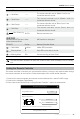
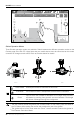
Gimbal Operation Modes
Three Gimbal operation modes are available. Switch between the different operation modes on the
Camera page of the DJI GO 4 App. Note that your mobile device must be connected to the remote
controller for changes to take effect. Refer to the table below for details:
Roll
Follow Mode Gimbal pan cannot be controlled in this mode.
Free Mode The Gimbal’s motion is independent of the aircraft’s orientation.
Reset
Tap to force the Gimbal orientation to re-align with aircraft’s
orientation by panning from gimbal’s current orientation. Pitch angle
will remain unchanged during the re-alignment.
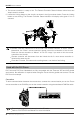
The user cannot control the gimbal pan in follow mode. In free mode, press and hold on
the C1 Button while rotating the control dial to adjust the yaw of the gimbal.
The gimbal will be in free mode when the “Slave” remote controller controls the gimbal in
Dual Remote Controllers Mode.