
User Manual-inspire 2


32
©
2016 DJI. All Rights Reserved.
INSPIRE 2
User Manual
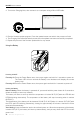
2. Turn on the Charging Hub, then connect it to a computer using a Micro USB cable.
3. Run the rmware update program. Press the update button and wait for the process to nish.
4. The Charging Hub will automatically restart when the update has been successfully completed.
5. Repeat this process if the rmware update fails for any reason.
Powering ON/OFF
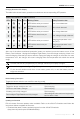
Powering On: Press the Power Button once, then press again and hold for 2 seconds to power on.
The Power LED will turn red and the Battery Level Indicators will display the current
battery level.
Powering Off: Press the Power Button once, then press again and hold for 2 seconds to power off.
Heating the Battery
Manual Heating: When the battery is powered off, press and hold the power button for 3 seconds to
initiate the battery to warm up manually.
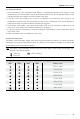
The battery will start to warm up when the temperature is below 59℉(15℃)with the LED1&2 and
LED3&4 blinking alternatively. The temperature of the battery will stop increasing when it reaches
68℉(20℃).
The temperature of the battery will be between 59°-68℉(15°-20℃)when it is above 59℉(15℃)with
the LED1 and LED4 blinking alternatively, lasting for approximately 30 minutes. And then it will be
powered off automatically.
Auto Heating: Insert the batteries into the aircraft and power on. When the temperature of the battery
is below 59℉(15℃), the battery will warm up automatically, and you may check the LED for current
power level.
Using the Battery