
User Manual-inspire 2

©
2016 DJI. All Rights Reserved.
23
INSPIRE 2
User Manual
Exiting ActiveTrack
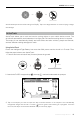
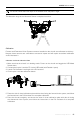
Use the following methods to exit ActiveTrack:
1. Tap the “ ” button on the screen.
2. Press the Intelligent Flight Pause button on the remote controller.
OR
Tripod Mode
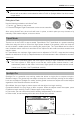
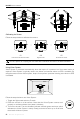
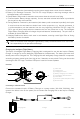
Tap the icon in the DJI GO 4 app to enable Tripod Mode. The Tripod Mode is a speed-controlling
mode that using the sticks to control the ight speed instead of the attitude, which can help the
aircraft to obtain a stable speed, thus reducing the joystick jitter. The Tripod Mode can be used in
many situations where rocker arm and slide rail are required as this mode can shoot smoother and
sharper videos.
In Tripod Mode, the maximum flight speed can be adjusted in DJI GO 4 app and the braking
distance is reduced to 10 ft (3 m). Responsiveness to stick movements is also reduced for smoother
movements.
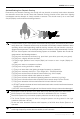
Only use Tripod Mode where the GPS signal is strong or light conditions are ideal for
the vision system. If GPS signal is lost and the vision system cannot function, it will
automatically switch to Atti mode. In this case, ight speed will increase and the aircraft
cannot hover in place. Use Tripod Mode carefully.
Spotlight Pro
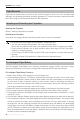
Spotlight Pro is a powerful new tracking mode that allows a single pilot to capture complex,
dramatic images. The gimbal will auto adjust to keep the camera always pointing at the subject.
Lock onto a subject in Spotlight Pro mode, and the gimbal camera can capture the locked subject
regardless of the directions that the aircraft ies.
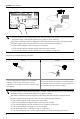
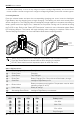
Quick Mode: Use your nger to draw a square with the object in to begin tracking.
Composition Mode: Use your nger to draw a square. When the subject enters the square, press
C2 button to begin tracking. Press C2 button again to stop tracking.
In Free mode, you can control the aircraft’s heading independently of the camera.
In Follow mode, aircraft heading will be the same as that of the camera.
H 10.0MD
30M
VS 2.0M/S VPS 2.0MH.S 10.0 KM/H
12
R
09:29
AE
P-GPS
AF/ MF
ISO
SHUT TER
EV
200 0.3
F
5.61/200
CAPA CIT Y
4KP3020:12 384G
SD TIME
4KP30
74%
70%
4.07V
4.07V
Compisition
Settings
Quick Compisition
In Flight (GPS)
5000K
WB
Custom
Aircraft Head
Free
Follow
After exiting ActiveTrack, the aircraft will hover in place, at which point you may choose to fly
manually, track another subject, or return to home.
You must follow local privacy laws and regulations when using ActiveTrack.
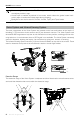
Aircraft will not be able to avoid obstacles while in Prole or Spotlight Mode. Use these modes
in open areas.