
User Manual-inspire 2



20
©
2016 DJI. All Rights Reserved.
INSPIRE 2
User Manual
The aircraft will automatically adjust its speed when it senses an obstacle in front or if it is ying too close
to the ground. DJI GO 4 app will prompt you if the aircraft is ying over the obstacle or from the left or right
side of the obstacle. However, this feature should not be relied upon for navigation between obstacles.
Failsafe procedures will override TapFly. If the GPS signal weakens, the aircraft will exit autonomous ight
and return to home.
12
R
09:29
AE
P-GPS
AF/ MF
ISO
SHUT TER
EV
200 0.3
F
5.61/200
CAPA CIT Y
4KP3020:12 384G
SD TIME
4KP30
74%
70%
4.07V
4.07V
H 10.0MD 30M
VS 2.0M/S VPS 2.0MH.S 10.0 M/S
In Flight (GPS)
5000K
WB
Custom
DO NOT guide the aircraft to y towards people, animals, small and ne objects (e.g. tree
branches and power lines) or transparent objects (e.g. glass or water).
Watch for the obstacles in the ight path and stay clear of them.
There may be deviations between the expected and the actual ight path of TapFly selection.
The selectable range for the target direction is limited. You cannot make a TapFly selection
close to the upper or lower edge of the screen.
TapFly Mode may not work properly when the aircraft is ying over water or snow covered areas.
Be extra cautions when ying in dark (< 300 lux ) or bright (>10,000 lux) environments.
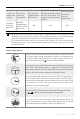
Enable the sticks to control the gimbal inside the DJI GO 4 app, and users can control
the gimbal’s orientation via the remote controller. When the sticks is in use, gimbal will
automatically change into free mode. At that time, use the right stick (Mode 2) to control the
pan motion while the left stick the pitch motion of the gimbal. Scroll the left dial to control the
ight speed of the aircraft.
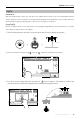
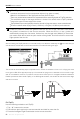
After conrming the TapFly selection, the aircraft will y in the direction marked by the icon. Note that you
can still use the control stick to control the movement of the aircraft during the ight.
30M
30M
Exit TapFly
Use the following methods to exit TapFly:
1. Tap “ ” button on the screen.
2. Pull back the pitch stick on the remote controller and hold for more than 3s.
3. Press the Intelligent Flight Pause button on the remote controller.