
User Manual-inspire 2



18
©
2016 DJI. All Rights Reserved.
INSPIRE 2
User Manual
Obstacle Avoidance During RTH*
Aircraft can now sense and actively attempt to avoid obstacles during RTH, provided that the
lighting conditions are adequate for the Forward Vision System. Upon detecting an obstacle, the
aircraft will act as follows:
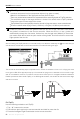
1. The aircraft will use the primary camera to identify obstacles as far as 984 feet (300 meters) in
front, allowing it to plan a safe route home.
2. The aircraft decelerates when an obstacle is sensed at 49 feet (15 meters) ahead.
3.The aircraft stops and hover then start ascending vertically to avoid the obstacle. Eventually, the
aircraft will stop climbing when it is at least 16 feet (5 meters) above the detected obstacle.
4. Failsafe RTH procedure resume, the aircraft will continue ying to the Home Point at the current altitude.
The Obstacle Sensing function is disabled during RTH descent. Proceed with care.
To ensure the aircraft returns home forwards, it cannot rotate during RTH while the For-
ward Vision System is enabled.
The aircraft cannot avoid obstacles beside or behind the aircraft.
Landing Protection Function
Landing Protection will activate during auto landing.
1. When Landing Protection determines that the ground is suitable for landing, the Inspire 2 will land gently.
2. If Landing Protection determines that the ground is not suitable for landing, the Inspire 2 will hover
and wait for pilot conrmation. The aircraft will hover if it detects the ground is not appropriate for
landing even when critically low battery warning appears. Only when the battery level decreases to 0%
will the aircraft starts landing. The user can still control the aircraft’s ight orientation.
3. If Landing Protection is not operational, the DJI GO 4 app will display a landing prompt when
the Inspire 2 descends below 0.7 meters. Tap to conrm or pull down the stick for 2s to activate
landing once ensure the environment is appropriate for landing.
The aircraft will not detect the landing ground with the landing protection function on in the
following circumstances:
When the user is controlling the pitch/roll/throttle sticks (Landing ground detection will be
re-activated once the sticks is not in use)
When the positioning system is not properly working (e.g. drift position error)
When the downward vision system is calibrated abnormally
When the light condition is not sufcient for downward vision system
When the obstacle is within 1 meter of the aircraft, the aircraft will decrease and hover at
the height of 0.7m above the ground. Then the aircraft will land upon receiving the conr-
mation of the user.
5 meters
15 meters
300 meters
*Coming soon.