
User Manual-inspire 2



14
©
2016 DJI. All Rights Reserved.
INSPIRE 2
User Manual
Flight Status Indicator
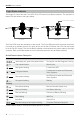
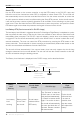
The Inspire 2 comes with the Front LED, Rear LED and Aircraft Status Indicator. The positions of
these LEDs are shown in the gure below:
The Front LEDs show the orientation of the aircraft. The Front LEDs glow solid red when the aircraft
is turned on to indicate the front (or nose) of the aircraft (the Front and rear LEDs can be turned
off in the DJI GO 4 app). The Aircraft Status Indicator communicates the system status of the ight
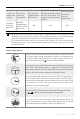
controller. Refer to the table below for more information about the Aircraft Status Indicator.
Aircraft Status Indicator Description
Normal
Alternating red, green and yellow ashes Turning On and Self Diagnostic Testing
×4 Four yellow ashes Warming Up
Slow green ashing P-mode with GPS*
×2 Two green ashes
P-mode with Forward and Downward
Vision Systems*
Slow yellow ashing
No GPS and Forward and Downward
Vision Systems
Fast green ashing Braking
Warning
Fast yellow ashing Remote Controller Signal Lost
Slow red ashing Low Battery Warning
Fast red ashing Critical Low Battery Warning
Red ashing IMU Error
—
Solid Red Critical Error
Fast alternating red and yellow ashing Compass Calibration Required
* Green ashes slowly in P-mode and ashes quickly in S-mode.
Rear LEDFront LED
Aircraft Status Indicator