
User Manual-inspire 2

10
©
2016 DJI. All Rights Reserved.
INSPIRE 2
User Manual
10
4
9
8
5
6
1
3
7
2
17 18 19
20
11
14
13
12
1615
2221
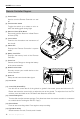
Remote Controller Diagram
[1] Power Button
Used to turn the Remote Controller on and
off.
[2] Transformation Switch
Toggle the switch up or down to raise or
lower the landing gear during ight.
[3] Return-to-Home (RTH) Button
Press and hold the button to initiate Return
to Home (RTH).
[4] Control Sticks
Controls the orientation and movement of
the aircraft.
[5] Status LED
Displays the Remote Controller's system
status.
[6] Battery Level LEDs
Displays the battery level of the Remote
Controller.
[7] Power Port
Connect to the Charger to charge the battery
of the remote controller.
[8] Mobile Device Holder
Securely mounts your mobile device to the
remote controller.
[9] Antennas
Relays aircraft control and video signal.
[10] Handle Bar
[11] Control Dial (Gimbal/FPV)
Use this dial to control the tilt of the gimbal. In gimbal’s free mode, press and hold on the C1
Button and rotate the control dial, to adjust the pan of the gimbal. To adjust the tilt of the FPV
camera, press and hold on the C2 Button and rotate the control dial.
[12] Camera Settings Dial
Turn the dial to adjust camera settings. (Only functions when the remote controller is connected
to a mobile device running the DJI GO 4 app.)
[13] Record Button
Press to start recording video. Press again to stop recording.
[14] Flight Mode Switch
Switch between P-mode, S-mode, and A-mode.