
Technical data




30
4 Maintenance
4 Maintenance
4.1 Changing the dust
filter bag
Change the dust filter bag at the latest when the
electronic dust filter bag change indicator (Fig. 17) shows
"red" or the suction power has decreased.
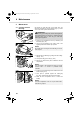
1. Open the dust compartment cover by unlatching and
then lifting it (Fig. 18).
2. Lift the dust compartment cover until it locks in the
highest position and remains open by itself.
3. Release the dust filter bag by pulling back the holding-
clip (Fig. 19/1.)
4. Then pull the bag up and out (Fig. 19/2.)
5. Remove any dust that may have collected in the dust
compartment.
6. Insert the new dust filter bag into the bottom side of the
holder first (Fig. 20/1.)
7. Then press it upwards against the holding-clip
(Fig. 20/2.) until this locks the bag into its position.
8. Close the dust compartment cover. It clicks shut
audibly.
ATTENTION:
When leaving your working-area, switch off the appliance
and mind the notices at ZChapter 3.3, "Switching off and
retracting power cord". In this way you avoid dust
destroying the appliance.
NOTE:
Be careful when removing the dust filter bag so that no
dust escapes.
NOTE:
You can dispose of the dust filter bag with your regular
domestic trash if it contains no prohibited waste
materials.
NOTE:
The dust compartment cover can only be closed with a
dust filter bag in place.
17
18
19
20
02_M7100_gb.book Seite 30 Dienstag, 8. April 2008 11:00 11