
Owner`s manual

3
SF72 Storage Enclosure Operation
This chapter contains the following information:
• A description of the various bus modes and system configurations in
which the SF72 storage enclosure functions
• A description of all front and rear panel controls and indicators
• Instructions on how to power up the SF72 storage enclosure
• Instructions on how to bring the SF72 storage enclosure on- and
off-line
3.1 SF72 Configurations
The SF72 storage enclosure is available with either two or four RF72
disk integrated storage elements (ISEs) installed. The two-ISE variant is
referred to as an SF72–HK, and the four-ISE variant is referred to as an
SF72–JK.
SF72 storage enclosures residing in the SF200 storage array can be
connected to a single host (or system) or to two hosts. When connected
to one system, the configuration is called single-host. When connected to
two or more systems, the configuration is called dual-host. Single-host
configurations support up to 48 GBytes of formatted storage with two
SF200 storage arrays. Dual-host configurations support up to 24 GBytes
of formatted storage in an SF200 storage array with two host systems.
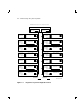
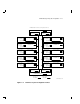
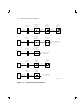
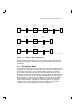
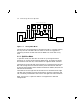
Figures 3–1 and 3–2 show the eight possible bus configurations in an
SF200 storage array cabinet.
3–1