
User's Manual
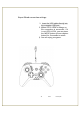


Nintendoswitchwiredconnectionsettings:
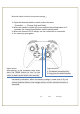
1. OpentheNintendoswitchconsoleandselectthemenu
"SystemSettings"‐‐‐‐"Controllersandsensors"‐‐‐‐"Pro
ControllerwiredCommunication"opens.
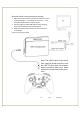
2. DirectlyplugthehandleUSBcableintothecharging
dockoftheNintendoconsoleUSB2.0port.
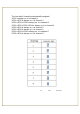
3. WhenthechannelLEDisalwayson,theconnection
issuccessful.
4.Youcanenjoyyourgame.
Note:TheUSB2.0portoftheswitch
hostsupportswiredcontrollers,and
the USB 3.0 port does not support
wired controllers. And only 2 wired
controllerscanbeusedatthesame
time.
‐11‐V:0.1Dec23,20