
Operation Manual




48
Parameters Description
2.5.1 Port-based QoS User can differentiate packet
priority by L4 port number or by
physical Ethernet port number.
2.5.2 Rate Policing QoS User can specify a L3/4 criterion
and associate it with a maximum
token (packet rate or data rate
based).
2.5.3 Guaranteed/Spare Class QoS Your ISP requires PPPoE
connection.
2.5.1 Port-based QoS
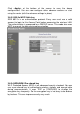
For Application based QoS, user can specify a destination port number
and associate it with a egress priority(High or Low). For example, if user
config port 7297 with high priority, then user would experience better
service quality for such flows.
For Port based QoS, user can specify the High/Low queue priority for each
Ethernet port and can apply total rate limit to any port from 128Kbps to
32Mbps or at Full-rate(100Mbps). Flow control can also be
enabled/disabled on per-port basis.