
Operation Manual



28
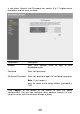
Parameter Description
Time Zone Select the time zone of the country you are
currently in. The router will set its time
based on your selection.
NTP Server # You can manually assign three time server
addresses here.
Time Here shows the time of current router
setting.
Click <Apply> at the bottom of the screen to save the above
configurations. You can now configure other advance sections or start
using the router (with the advance settings in place)
2.1.2 Password Settings
You can change the account name and password required to log into the
broadband router's system web-based management. By default, the
account name is admin and the password is 1234. So please change the
account name and assign a password as soon as possible, and store it in