
Operation Manual




17
1.1 Dynamic IP
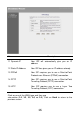
Choose Dynamic IP if your ISP will automatically give you an IP address.
S om e IS P ’s m a y also re quire th at yo u fill in a d ditional information such as
MAC address (see screen below).
Note: The MAC address section is optional and you can skip this section if
your ISP does not require these settings for you to connect to the Internet.
Parameters Description
Clone MAC Your ISP may require a particular MAC address in
order for you to connect to the Internet. This MAC
address is the P C ’s M A C ad dress th at yo ur IS P h ad
originally connected your Internet connection to. Type
in this MAC address in this section or use the “Clone
MAC Address” button to replace the WAN MAC
address with the MAC address of that PC (you have to
be using that PC for the Clone MAC Address button to
w ork). To find o ut th e P C ’s M A C add re ss see A p pendix
A. (see Glossary for an explanation on MAC address)
Click <OK> when you have finished the configuration above.
Congratulations! You have completed the configuration for the Cable