
Operation Manual


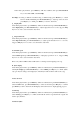


Enter into recording interface, when stop or pause, press Menu key will show: Record Format,
Record quality, Record Gain, Save path.
4. Record Format
Enter into recording interface, when stop or pause, press Menu key into submenu, press
Previous/Next key to select Record Format, press Previous/Next key to select recorded file
format, then press Play key to confirm, press Exit key return to last menu. Default as WAV
format.
5. Record quality/ Record Gain
Enter into recording interface, when stop or pause, press Menu key into submenu, press
Previous/Next key to select Record quality/ Record Gain, press Play key to confirm, press Exit
key return to last menu. Record quality: Low, Medium, High. Record Gain: 1-5 for options.
6. Save path
Enter into recording interface, when stop or pause, press Menu key into submenu, press
Previous/Next key to select Save path, press Play key to confirm, press Exit key return to last
menu. It provides Internal memory and External memory. (Only with
Micro SD card it will
display External Memory)
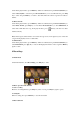
8.3 Recording interface
Recording interface as below:
If in the recording process, there is no blank space, it will be show "full space", then save the
recorded file, and return to the recording stopped state.
9 FM Radio