
Operation Manual




7 Music
7.1 Main menu
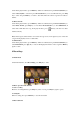
Under main interface, select MUSIC, press Play key into All music interface, as below
picture:
Now Playing: List the last played song list and light on the last played song, if enter it will play
continually from last time. You can also select to play other songs.
All music: display all music file saved under MUSIC folder.
Artist: display artist list, select one artist, will show song list of the artist.
Album: display album list, select one album, will show song list of the album.
Genre: display genre list, select one genre, will show song list of the genre.
My music list: display 5 play lists, select one list, will show song list of the list.
Dir list: Internal Memory, External Memory. Internal Memory is to list the contents of the
MUSIC folder. You can find in turn until you have selected a song file, and press
Play key to start playing. External Memory is to list the contents of
Micro SD card, it
will no show without
Micro SD card
Record list: display all the record file lists. Note: these files are stored under RECORD folder.
Tag list: display all the tags set in the player on the song list, up to 32 tag lists.
Star level: display six levels (non-hierarchical and 1-5 star), select the corresponding level, press
MENU key to enter the next level, and it will show songs correspond to this level.
7.2 Play interface
Selected songs in the song list, press Play key to enter the music play interface. There are two
modes: normal mode and lyrics mode. If the song without lyrics, it is normal mode. If the song
with lyrics, it is lyrics mode.(Note: only open in lyric setting, it can display lyric. And the lyric
name should be same as the song)
Below picture is normal mode interface: