
Operation Manual




5 Camera mode
5.1 Main menu
Under main interface, select Camera, press Play key to enter. It does not support multi-tasking
under camera mode
5.2 Basic operation and submenu
Basic operation
Press V-, V + to adjust the focal length, there are10 levels: 1.0 ~ 2.0,
Press Play key or Take photo key to take photo, press Exit key return to last menu.
The file is saved in the CAMERA folder under the PICTURE folder in the internal memory.
:
Under camera mode, short press this key to check photo directly.
:
Under camera mode, short press this key to delete photo directly.
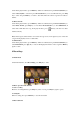
In take photo interface, press Menu key into submenu
Press Previous/Next key to select and press Play key to confirm. Then press Exit key to return.
Submenu
1. Preview