
2D Code and Bar Code Handy Terminal User's Manual BHT-100Q, BHT-100B




73
Chapter 2. Getting Started the BHT and System Mode
Enabling/disabling the function keys
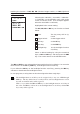
Selecting the "6:FUNC KEY" on the SET KEY menu
calls up the screen shown at left.
Highlighted is the current setting.
1 ALL OFF Disables all function keys.
2 F1-F4 ON Enables four function keys F1
through F4.
3 F1-F8 ON Enables all of the eight function
keys F1 through F8.
Select a desired setting by using the numerical
keys or M1 and M2 keys, and then press the ENT
key. The screen returns to the SET KEY menu.
(When "2:F1-F4 ON" is
selected)
(When "3:F1-F8 ON" is
selected)
Display positions of function keys
• Even if enabled in the above setting, these function keys will not work in System
Mode.
• If the screen scrolls, no function keys will move.