TABLE TOP SINGLE CD PLAYER / æ ˜≥ ª≥ Ê∫ –≈ J Æ g∞¤ Ω L DN-S3000 OPERATING INSTRUCTIONS BEDIENUNGSANLEITUNG MODE D’EMPLOI ISTRUZIONI PER L’USO INSTRUCCIONES DE OPERACION GEBRUIKSAANWIJZING BRUKSANVISNING æ fi ß @ ª°© ˙ Æ — FOR ENGLISH READERS FÜR DEUTSCHE LESER POUR LES LECTEURS FRANCAIS PER IL LETTORE ITALIANO PARA LECTORES DE ESPAÑOL VOOR NEDERLANDSTALIGE LEZERS FOR SVENSKA LÄSARE §§ §Â PAGE SEITE PAGE PAGINA PAGINA PAGINA SIDA ≤ ƒ 111 116 ~ 121 ~ 136 ~ 151 ~ 166 ~ 181 ~ 196 ~ ≠∂ ~ PAGE SEITE PAGE PA
CAUTION SAFETY INSTRUCTIONS 1. Read Instructions – All the safety and operating instructions should be read before the product is operated. 2. Retain Instructions – The safety and operating instructions should be retained for future reference. CAUTION: TO REDUCE THE RISK OF ELECTRIC SHOCK, DO NOT REMOVE COVER 3. Heed Warnings – All warnings on the product and in the operating instructions should be adhered to. (OR BACK). NO USER SERVICEABLE PARTS INSIDE.
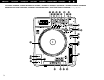
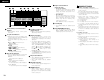
ENGLISH DEUTSCH FRANÇAIS ITALIANO ESPAÑOL NEDERLANDS SVENSKA TOP PANEL DIAGRAM / OBERES BEDIENFELD-SCHEMA / SCHEMA DU PANNEAU SUPERIEUR / SCHEMA PANNEAU SUPERIEUR DIAGRAMA DEL PANEL SUPERIOR / OVERZICHT VAN BOVENPANEEL / BILD ÖVER ÖVERSTA PANELEN / ≥ª≠ ±™ Oµ¯π œ !2 !4 !6 !8 @6 @0 @1 @7 !3 !5 !7 !9 @8 @2 @3 @4 @5 @9 #1 #2 !1 #3 #4 #5 !0 o i #9 3 #8 #7 #6 #0
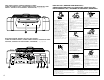
FRONT PANEL DIAGRAM / VORDERES BEDIENFELD-SCHEMA / SCHEMA DU PANNEAU AVANT / SCHEMA PANNEAU AVANT / DIAGRAMA DEL PANEL FRONTAL / OVERZICHT VAN VOORPANEEL / FRONTPANELEN / ´e≠ ±™ Oµ¯π œ q w REAR PANEL DIAGRAM / HINTERES ANSCHLUSSFELD-SCHEMA / SCHEMA DU PANNEAU ARRIERE / SCHEMA PANNEAU ARRIERE / DIAGRAMA DEL PANEL POSTERIOR / OVERZICHT VAN ACHTERPANEEL / BAKPANELEN / ´ ·≠ ±™ Oµ¯π œ e r ty u NOTE ON USE / HINWEISE ZUM GEBRAUCH / OBSERVATIONS RELATIVES A L’UTILISATION / NOTE SULL’USO NOTAS SOBRE EL USO /
• DECLARATION OF CONFORMITY We declare under our sole responsibility that this product, to which this declaration relates, is in conformity with the following standards: EN60065, EN55013, EN55020, EN61000-3-2 and EN610003-3. Following the provisions of 73/23/EEC, 89/336/EEC and 93/68/EEC Directive.
ENGLISH – TABLE OF CONTENTS – z x Main features .....................................................6 c v b n m , . Part names and functions ..........................8 ~ 10 Connections/Installation/ Installing the 7“record adaptor...........................7 Compact discs ..................................................10 Basic operation .................................................11 Next Track Reserve ..........................................12 Scratch........................................
ENGLISH (3)INSTALLING THE 7” (17cm) RECORD ADAPTOR 2 CONNECTIONS/INSTALLATION/ Your own 7” (17cm) vinyl record can be installed on this product by using the provided adaptor. This original design grants you the freedom to use your favorite vinyl record for that ultimate analog turntable feel. INSTALLING THE 7“(17cm) RECORD ADAPTOR (1)CONNECTIONS *Make sure the record used is flat and not warped. 1. Turn off the POWER switch. 2.
ENGLISH 3 PART NAMES AND FUNCTIONS (3) Top panel (1) Front panel CAUTION: • Note that there are many buttons working two different function selected by short time pushing or long pushing (1second or more). The mark indicates short time push function and mark indicates long time push function. q Disc loading slot • Load the disc slowly, and release it once the DN-S3000 starts grabbing the disc in. CAUTIONS: • Do not load discs when the power is turned off.
ENGLISH !9 (SAMP)EXIT/RELOOP • Use this to turn the Sampler Loop mode on and off. Also acts as EXIT/RELOOP button for Sampler Loop to exit or back again. @0 A/B TRIM button • With push of this button, the A and B point trim mode changes on and off while in PLAY or CUE mode. @1 (SAMP.) STOP button • Push this button while in Sampler record or playback, Sampler record or playback stops. @2 TITLE button • CD TEXT: When there is CD text data, the CD text data is displayed when the button is pressed.
ENGLISH o Play Position indicators (4) Display q w A1 e r t y (lower 33 dots) u B TOTAL REMAIN ELAPSED CONT. SINGLE m s s m KEY ADJ. f DUMP RVS MEMO i t q Track, minute, second and frame displays • These displays indicate current position information. w Loop mode indicators • DN-S3000 has Loop mode indicators which consist of A , B and two arrows. A and B marks indicate A and B points are exist. • Two arrows indicate loop setting mode as follow.
ENGLISH 5 BASIC OPERATION Pitch Bend Play and pause • Each push of the i PLAY/PAUSE (13) button switches between playback and pause. PLAY/PAUSE (13) button illuminates solid green during playback and flashed in pause. • When the i PLAY/PAUSE (13) button is pushed during play, the DN-S3000 pauses playback at that point. Push i PLAY/PAUSE (13) button once again and playback resumes. • When the Scratch mode is set to MAIN, the Platter turns when the Main Track is played.
ENGLISH 6 NEXT TRACK RESERVE • It is possible to standby at the beginning of the next track to be played while continuing to play the current track and to start playback of the next track without interrupting playback. 1 e q w Enter Next Track mode q When the NEXT TRACK button is pushed, the NEXT TRACK RESERVE function is turned on. • When this mode is set, this button and CUE button blink. • When the button is pushed again, the NEXT TRACK RESERVE mode is turned off.
ENGLISH 8 SEAMLESS LOOP/HOT START/STUTTER Stutter Seamless Loop/Hot Start/Stutter • A point can be also used for Stutter playback. Operation display (refer to the section describing the display) q, w, e t, y y 5 r t To enable stutter playback, push FLIP button for A button, then FLIP LED turns off. Press the FLIP button to switch between the Hot Start/Seamless Loop and Stutter modes.
ENGLISH 9 A/B TRIM Select B point (in A-B Trim) • The Seamless Loop and Sampler loop A and B points can be fine-adjusted using the Scratch Disc. • There are two ways for doing this. A-B Trim: Trim the points during loop playback as a rehearsal. A/B Move: Move the points using the fast search or manual search. A/B Move can not be used with Sampler loop. r, u, !1 e, t, o, !2 y, i, !0, !2 5 y Select the A-B Trim mode and to select the B point, push the B button after selecting the A point.
ENGLISH 10 SAMPLER Adjust pitch Exit and Reloop DN-S3000 has Sampler of 15 seconds length. This Sampler can also be looped and scratching during playback. q, r, w, o i, !0 !0 6 y, u u The EXIT/RELOOP button can be used same as Seamless Loop function. Reverse Play e, t !1, !3 7 !4, !6 !2, !5 RVS i You can play the Sampled sound in reverse by pushing the RVS button. In reverse play mode RVS LED lights up.
ENGLISH 11 MP3 PLAYBACK Select the file The DN-S3000 can playback MP3 files via CD-R/RW media made according to the following conditions. * MP3 disc’s made by formats other than below settings cannot be played back on our system. * In most cases, you can find the below settings within the properties of your burners PC software. Please refer to your manual or contact your software vendor for assistance regarding these settings.
ENGLISH 12 PLATTER EFFECT BRAKE Simulates a winding-down sound of a turntable coming to a full stop slowly. Adds a echo sound when playback stops. 2-1 w r ★1 ★2 ★3 ★4 q e DRAG-S (DRAG START): w The DRAG-S time can be selected with the PARAMETERS knob. Simulates the dragging sound of a turntable starting up from a stop mode. 1-1 q The DRAG-S function can be turned on and off by pressing the DRAG-S button.
ENGLISH 13 MEMO (Custom Setting Memory) CD setting information can be stored in the non-volatile memory. The stored information can be called out of the memory later, making it easy to prepare for your mixing. 1. About MEMO • Up to 5000 memo points can be stored to internal memory for later recall. The number of tracks on a particular CD only limits the amount of memo points available per that disc. Example: If your CD has 22 tracks, you can only save up to 22 memos. (1 memo group per track.
ENGLISH 14 PRESET 1. Preset mode q The preset mode is available when @5 PRESET button is pushed for more than 1 sec while DN-S3000 is in Cue, pause or no disc mode. w Turn the #0 PARAMETERS knob to select the preset item. e After selecting an item, push the #0 PARAMETERS knob to select the preset data. r To change other Preset items, repeat these steps. t Push the @5 PRESET, !0 CUE or i PLAY/PAUSE (13) button to exit from the Preset mode. 2.
ENGLISH 15 SPECIFICATIONS 16 REPLACING THE BELT GENERAL Type: Disc type: • On the DN-S3000, the platter is driven by a belt. In the unlikely case of trouble, use the procedure described below to replace the belt.
DEUTSCH – INHALT – z x Hauptmerkmale ................................................21 c Bezeichnung der teile und deren funktionen......................................23 ~ 25 v b n m , . CD-Platten ........................................................25 Anschlüsse/Installation/ Installation der 7“(17cm)-Plattenadapter..........22 Allgemeiner betrieb ..........................................26 Reservierung Nächster Titel .............................27 ⁄0 ⁄1 ⁄2 ⁄3 ⁄4 ⁄5 ⁄6 4.
DEUTSCH (3)INSTALLATION DER 7” (17cm)-PLATTENADAPTOR 2 ANSCHLÜSSE/INSTALLATION/ INSTALLATION DER 7“(17cm)-PLATTENADAPTOR (1)ANSCHLÜSSE 1. Schalten Sie den POWER-Schalter aus. 2. Schließen Sie Cinch-Steckerkabel zwischen den Ausgängen des DN-S3000 und Eingängen Ihres Mixer an. 3. Falls Ihr Mixer, wie unser DENON DN-X800 oder DN-X400, mit der Fader Start-Funktion ausgestattet ist, schließen Sie die Buchsen FADER 1, 2 mittels des 3,5 mm Stereo-Ministeckerkabels an den Mixer an. 4.
DEUTSCH 3 BEZEICHNUNG DER TEILE UND DEREN FUNKTIONEN (3) Oberes Bedienfeld (1) Bedienfeld ACHTUNG: • Beachten Sie dabei, dass viele Tasten zwei verschiedene Funktionen erfüllen, die durch kurzes Antippen oder langes Drücken (1 Sekunde oder länger) gewählt werden können. Das Zeichen steht für die Funktion bei kurzem Antippen und das Zeichen steht für die Funktion bei langem Drücken. q Disc-Ladeschlitz • Legen Sie die Disc langsam ein und lassen Sie sie los, wenn der DN-S3000 die Disc einzieht.
DEUTSCH !6 B-Taste • Verwenden Sie diese Taste, um den B-Punkt für den A-Punkt von Seamless Loop einzustellen. @3 !7 (SAMP) B-Taste • Verwenden Sie diese Taste, um den B-Punkt für den Sampler Loop einzustellen. !8 EXIT/RELOOP-Taste • Verwenden Sie diese Option zum Verlassen oder kehren Sie zur Seamless LoopWiedergabe zurück. Mit dieser Funktion können Sie dem Looping eine Variation hinzufügen. • Die LED zeigt an, was beim Looping vor sich geht.
DEUTSCH i MEMO-Anzeige (4) Display q w A1 e r t y • Die MEMO-Anzeige wird auf dem Display angezeigt, wenn eine Memo-Einstellung für den gegenwärtig wiederzugebenden Titel vorhanden ist, bei dem der Standby-Modus im Moment eingestellt ist. u o Wiedergabepositions-Anzeigen B TOTAL REMAIN ELAPSED CONT. SINGLE m s m s KEY ADJ.
DEUTSCH 5 ALLGEMEINER BETRIEB Pitch Bend Wiedergabe und Pause • Bei jeder Betätigung der i PLAY/PAUSE-Taste (13) wird zwischen Wiedergabe und Pause umgeschaltet. Die PLAY/PAUSE-Taste (13) leuchtet während der Wiedergabe in einem kräftigen Grün und blinkt im Pause-Modus. • Wenn die i PLAY/PAUSE-Taste (13) während der Wiedergabe gedrückt wird, unterbricht der DN-S3000 die Wiedergabe an dieser Stelle. Wenn Sie die i PLAY/PAUSE-Taste (13) noch einmal drücken, wird die Wiedergabe fortgesetzt.
DEUTSCH 6 RESERVIERUNG NÄCHSTER TITEL • Es ist möglich, am Beginn des als Nächstes wiederzugebenden Titels in den Standby-Modus zu schalten, während die Wiedergabe des gegenwärtigen Titels fortgesetzt wird, und die Wiedergabe des nächsten Titels ohne eine Unterbrechung der Wiedergabe zu starten. Gehen Sie in den Nächster Titel-Modus q Wenn die NEXT TRACK-Taste gedrückt wird, wird die NEXT TRACK RESERVE-Funktion eingeschaltet.
DEUTSCH 8 SEAMLESS LOOP/HOT START/STUTTER Stutter • Der A-Punkt kann auch für die StutterWiedergabe verwendet werden. Seamless Loop/Hot Start/Stutter Betriebs-Display (lesen Sie dazu den Abschnitt, der das Display beschreibt) q, w, e t, y y 5 r t Drücken Sie zur Aktivierung der Stutter-Wiedergabe die FLIP-Taste für den A-Punkt; anschließend schaltet sich die FLIP LED-Anzeige aus. Drücken Sie die FLIP-Taste, um zwischen dem Hot Start/Seamless Loop- und Stutter-Modus umzuschalten.
DEUTSCH 9 A/B TRIM Wählen Sie den B-Punkt aus (A-B-Trim) • Die A- und B-Punkte für Seamless Loop und Sampler-Loop können einfach unter Verwendung der Scratch-Disc fein eingestellt werden. • Dies kann auf zwei Vorgehensweisen gemacht werden. A-B Trim: Trimmen Sie die Punkte während der Loop-Wiedergabe. A/B Move: Verschiebt die Punkte mittels der Schnellsuche oder manuellen Suche. A/B Move kann nicht zusammen mit Sampler Loop verwendet werden.
DEUTSCH 10 SAMPLER Ausschalten und Reloop Der DN-S3000 verfügt über einen Sampler mit einer Länge von 15 Sekunden. Dieser Sampler kann während der Wiedergabe auch in den Looping- und Scratchen-Modus geschaltet werden. u Die EXIT/RELOOP-Taste kann wie die Seamless LoopFunktion verwendet werden. q, r, w, o i, !0 !0 6 y, u Stellen Sie die Tonhöhe ein Reverse-Wiedergabe e, t !1, !3 !4, !6 7 !2, !5 i Durch Drücken der RVS-Taste RVS können Sie den gesampelten Sound rückwärts wiedergeben lassen.
DEUTSCH 11 MP3-WIEDERGABE Wählen Sie die Datei aus. Der DN-S5000 ist in der Lage, MP3-Dateien über CD-R/RW-Medien wiederzugeben, die unter den folgenden Bedingungen erstellt worden sind. * MP3-Discs, die von anderen als den unten aufgeführten Formateinstellungen erstellt worden sind, können von unserem System nicht wiedergegeben werden. * In den meisten Fällen finden Sie die unten aufgeführten Einstellungen in den Eigenschaften Ihrer BrennerPC-Software wieder.
DEUTSCH 12 PLATTER EFFECT BRAKE Zur Simulierung eines sich herunter windenden Sounds eines Platters, der langsam zu einem vollständigen Stoppen kommt. 2-1 Adds a echo sound when playback stops. e Die BRAKE-Funktion kann durch Drücken der BRAKE-Taste ein- und ausgeschaltet werden. w r DUMP/RVS t Der Modus wird bei jedem Drücken der DUMP/RVS-Taste 3-1 (Dump/Reverse) in der folgenden Reihenfolge umgeschaltet: DUMP → RVS → Aus.
DEUTSCH 13 MEMO (Anwendereinstellungs-Speicher) Die CD-Einstellungsinformation kann im permanenten Speicher gespeichert werden. Die gespeicherte Information kann später aus dem Speicher abgerufen werden, um Ihnen das Mischen zu erleichtern. 1. Informationen über MEMO • Für das spätere Abrufen können bis zu 5000-Memo-Punkte im inneren Speicher abgelegt werden. Die Anzahl der Tracks auf einer bestimmten CD schränkt nur die Anzahl der verfügbaren Memo-Punkte auf dieser Disc ein.
DEUTSCH 14 PRESET 1. Preset-Modus q Der Preset-Modus ist aktiviert, wenn die @5 PRESET-Taste länger als 1 Sek. gedrückt wird, während sich der DN-S5000 im Cue-, Pause- oder No Disc-Modus befindet. w Drehen Sie den #0 PARAMETERS-Knopf , um den Preset-Punkt auszuwählen. e Nach der Auswahl des Punktes den #0 PARAMETERS-Knopf drücken, um die Preset-Daten auszuwählen. r Wiederholen Sie diese Schritte, um die Preset-Daten zu ändern.
DEUTSCH 15 TECHNISCHE DATEN 16 RIEMENAUSTAUSCH ALLGEMEIN Typ: Disc-Typ: • Beim DN-S3000 wird der Platter durch einen Riemen angetrieben. Für den unwahrscheinlichen Fall, dass in diesem Zusammenhang Probleme auftreten, führen Sie bitte das unten beschriebene Verfahren durch, um den Riemen auszutauschen.
16-11, YUSHIMA 3-CHOME, BUNKYO-KU, TOKYO 113-0034, JAPAN Telephone: (03) 3837-5321 Printed in Japan 511 4086 009