
Operation Manual






68
4
When the Cursor down button is pressed at the very
bottom of the screen, the screen for the next preset
memory block appears.
It is also possible to select the desired preset
memory block by selecting “Block” then pressing
the Cursor left and right buttons.
[2] Preset Skip
When selecting preset channels using the Preset up and down buttons, it is possible to skip specific preset channels.
3−7.Preset Skip
Block A
A2
FM
89.10M㎐:
A3
FM
98.10M㎐:
A4
FM
107.90M㎐:
A5
FM
90.10M㎐:
A6
FM
90.10M㎐:
A7
FM
90.10M㎐:
A8
FM
90.10M㎐:
A1
FM
87.50M㎐:
ON
ON
ON
ON
ON
ON
ON
ON
A1 87.50M ON
*Preset Skip
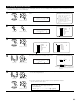
1
Select “Preset Skip” at the Tuner Presets screen.
Auto Preset Memory
Preset Skip
Preset Name
Exit
3−7.Tuner Presets
Preset Skip
*Tuner Presets
2
Switch to the Preset Skip screen.
3
CH SEL
ENTER
(Main unit) (Remote control unit)
CH SEL
ENTER
(Main unit) (Remote control unit)
CH SEL
ENTER
(Main unit) (Remote control unit)
q Select the preset channel you want to
skip.
w Select “ON” or “OFF”.
3−7.Preset Skip
Block B
B2
AM
600k㎐:
B3
AM
1000k㎐:
B4
AM
1400k㎐:
B5
AM
1500k㎐:
B6
AM
1710k㎐:
B7
FM
90.10M㎐:
B8
FM
90.10M㎐:
B1
AM
520k㎐:
ON
ON
ON
ON
ON
ON
ON
ON
A1 87.5M OFF
*Preset Skip
CH SEL
ENTER
(Main unit) (Remote control unit)
CH SEL
ENTER
(Main unit) (Remote control unit)
3−7.Preset Skip
Block A
A2
FM
89.10M㎐:
A3
FM
98.10M㎐:
A4
FM
107.90M㎐:
A5
FM
90.10M㎐:
A6
FM
90.10M㎐:
A7
FM
90.10M㎐:
A8
FM
90.10M㎐:
A1
FM
87.50M㎐:
ON
ON
ON
ON
ON
ON
ON
OFF
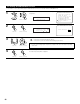
5
Repeat steps 3 and 4.
6
Press the ENTER button to return to the Tuner Presets screen.
CH SEL
ENTER
(Main unit) (Remote control unit)