
Operation Manual






65
3-5. Setting the IEEE1394 Assign
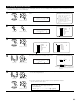
• Assign the device connected by IEEE1394 cable to an input source. The power of the device to be assigned must be turned on ahead of time.
1
2
1.Digital In Assign
2.EXT.IN Setup
3.Input Function Lev.
4.Function Rename
5.IEEE1394 Assign
6.IEEE1394 Auto Func.
7.Tuner Presets
Exit
3.Audio Input Setup
3−5.IEEE1394 Assign
I1 DVD−3910 : −−−
I2 DVD−5900 : −−−
Select “IEEE1394 Assign” at the Audio Input Setup
Menu.
Display the IEEE1394 Assign screen.
IEEE1394 Assign
*Audio In Setup
DVD-3910 ---
*IEEE1394Assign
q Select the device to be assigned to the
input source.
w Select the input source.
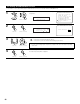
3
4
Enter the setting.
The Audio Input Setup Menu reappears.
If you do not wish to assign the device connected by IEEE1394 cable to an input source, the IEEE1394 input can be selected by turning the
FUNCTION knob. In this case, the connection information is cleared when the power of the connected device or the AVR-5805 is turned off,
so the selection procedure must be performed again.
3−5.IEEE1394 Assign
I1 DVD−3910 :
I2 DVD−5900 : −−−
DVD
DVD-3910: DVD
*IEEE1394Assign
NOTES:
• By default, if no device has been connected using an IEEE1394 cable in the past, “No Connection” is displayed.
• “Connection Change” is displayed if there is a change in the IEEE1394 connection status while this screen is displayed.
• If the model name cannot be acquired from the connected IEEE1394 device, “UNKNOWN” is displayed.
• If an IEEE1394 device other than one for IEEE1394 audio playback is connected, “Not Play” is displayed and the input source cannot be
assigned.
CH SEL
ENTER
(Main unit) (Remote control unit)
CH SEL
ENTER
(Main unit) (Remote control unit)
CH SEL
ENTER
(Main unit) (Remote control unit)
CH SEL
ENTER
(Main unit) (Remote control unit)
CH SEL
ENTER
(Main unit) (Remote control unit)