
Operation Manual






64
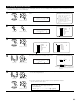
Repeat step 5 to input the input source name.
6
(Main unit)
CH SEL
ENTER
(Remote control unit)
CH SEL
ENTER
(Main unit)
(Remote control unit)
CH SEL
ENTER
(Main unit)
(Remote control unit)
If you wish to set the input source back to as it was initially, press the Cursor down button
with the input source highlighted.
If “Yes” is selected for “Default”, the setting are automatically reset to the default name.
3−4.Function Rename
: TU−1500
Yes
Tuner
Default
Rename Clear
Rename TUNER
3−4.Function Rename
: TU−1500
Yes
Tuner
Default
Default : Yes
Rename TUNER
7
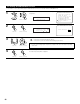
Once all the characters have been input, press the ENTER button.
The Function Rename screen reappears.
Use the same procedure to change other input source names as well.
When the input source is selected, the display is as shown below.
TU−1500
STEREO
Mode
Input
ANALOG
STEREO
TU-1500
Example: When the name has been changed to “TU-1500”
CH SEL
ENTER
(Main unit) (Remote control unit)
8
Enter the setting.
The Audio Input Setup Menu reappears.
CH SEL
ENTER
(Main unit) (Remote control unit)