
Operation Manual






63
3-4. Setting the Function Rename
• The names of the input sources displayed on the front display and on the on-screen display can be changed. The names or brands of the devices
connected to the input sources can be input.
1
2
1.Digital In Assign
2.EXT.IN Setup
3.Input Function Lev.
4.Function Rename
5.IEEE1394 Assign
6.IEEE1394 Auto Func.
7.Tuner Presets
Exit
3.Audio Input Setup
3−4.Function Rename
: TUNER
: PHONO
: CD
: CDR/TAPE
: DVD
: VDP
: TV
Tuner
Phono
CD
Tape
DVD
VDP
TV
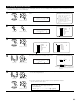
Select “Function Rename” at the Audio Input Setup
Menu.
Display the Function Rename screen.
Function Rename
*Audio In Setup
TUNER TUNER
*FunctionRename
Select the input source whose name you want to change.
3
3−4.Function Rename
: TUNER
: PHONO
: CD
: CDR/TAPE
: DVD
: VDP
: TV
Tuner
Phono
CD
Tape
DVD
VDP
TV
3−4.Function Rename
: DBS
: VCR−1
: VCR−2
: VCR−3
: VCR−4
: V.AUX
DBS
VCR-1
VCR-2
VCR-3
VCR-4
V.Aux
4
Press the Cursor left and right buttons.
The screen switches to the character input screen.
3−4.Function Rename
: TUNER
Yes
Tuner
Default
TUNER
Rename TUNER
Example: When “TUNER” is selected and
the Cursor left and right buttons are
pressed
CH SEL
ENTER
(Main unit) (Remote control unit)
CH SEL
ENTER
(Main unit) (Remote control unit)
CH SEL
ENTER
(Main unit) (Remote control unit)
CH SEL
ENTER
(Main unit) (Remote control unit)
5
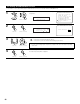
q Move the cursor to choose the position at which you want to input the character using the
Cursor left and right buttons.
w Select the character to be input using the Cursor up and down buttons.
Up to 8 characters can be input.
CH SEL
ENTER
(Main unit) (Remote control unit)
CH SEL
ENTER
(Main unit) (Remote control unit)
AB C D E F G H I J K L M N O P Q R S T U V W X Y Z
a b c d e f g h i j k l m n o p q r s t u v w x y z
0 1 2 3 4 5 6 7 8 9
! “ # % & ‘ ( )
*
+ , – . / : ; < = > ? @ [ \ ] (space)