
Operation Manual




50
6
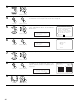
Set the distance between the center speaker and listening position.
The distance changes in units of 0.1 foot (0.03 meters) or 1 foot (0.3 meters) each time the
button is pressed. Select the value closest to the measured distance.
If “Yes” is selected for “Default”, the settings are automatically reset to the default values.
When “Step” is selected, you can select the unit of “1ft (0.1m)” or “0.1ft (0.01m)”.
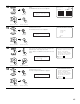
Please note that the difference of distance for every speaker should be 20 ft (6.0 m) or less. If
you set an invalid distance, a CAUTION notice, such as screen right will appear. In this case,
please relocate the blinking speaker(s) so that its distance is no larger than the value shown in
highlighted line.
2−3.Delay Time
SL A 10.0
ft
SR A 10.0
ft
SL B 10.0
ft
SR B 10.0
ft
SBL 10.0
ft
SBR 10.0
ft
Step 1
ft
Default
FL 12.0
ft
FR 12.0
ft
C 12.0
ft
RELOCATE BLINKING SP!
SW 30.0
ft
Ye s
Example: When the distance is set to 12 feet
for the center speaker
2−3.Delay Time
Step 1
ft
Default
FL 12.0
ft
FR 12.0
ft
C 12.0
ft
SW 12.0
ft
Ye s
7
Enter the setting.
The Speaker Setup Menu reappears.
The AVR-5805 automatically sets the optimum
surround delay time for the listening room.
CH SEL
ENTER
(Main unit) (Remote control unit)
CH SEL
ENTER
(Main unit) (Remote control unit)