
Operation Manual




42
4
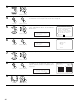
Enter the setting.
The Auto Setup / Room EQ Menu reappears.
CH SEL
ENTER
(Main unit) (Remote control unit)
2 Specifications and Setup Procedure for Non-DENON Microphone Use for AVR-5805 Auto Setup and Room EQ
Function
Required Microphone for DENON Auto-Setup Room EQ : Product name Countryman B3.
Required Microphone Amplifier Specification for DENON Auto-Setup Room EQ.
• Gain : 29 dB
•Frequency Response : 10 ~ 30 kHz Full Flat (Ex : Rane MS1b)
Microphone Placement
• Set the microphone using microphone stand, or other method, at the prime listening position.
• Point the top of the microphone toward the ceiling.
• Adjust the height so that the top of microphone to matches the height of your ear when sitting.
3
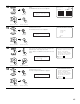
Select the Mic input jack or V.AUX L jack.
CH SEL
ENTER
(Main unit) (Remote control unit)
1-4. Setting the MIC Input Select
1.Auto Setup
2.Room EQ Setup
3.Direct Mode Setup
4.Mic Input Select
5.Parameter Check
Exit
1.Auto Setup/Room EQ
1
Select “Mic Input Select” at the Auto Setup / Room
EQ Menu.
CH SEL
ENTER
(Main unit) (Remote control unit)
Mic In Select
*AutoSet/RoomEQ
• Sets whether the setup microphone is connected to the PIN JACK (V.AUX L channel) connector or the MINI JACK (SETUP MIC) connector.
2
Display the Mic Input Select screen.
CH SEL
ENTER
(Main unit) (Remote control unit)
1−4.Mic Input Select
Mic : L
V.Aux
Mic
*Mic In Select