
Operation Manual





109
7-5. Setting the AC Outlet Assign
• Set the power of the three AC outlets on the AVR-5805’s rear panel to ON or OFF with respect to the different input sources.
1
1.Channel Setup
2.Power Amp Assign
3.Volume Control
4.Trigger Out
5.AC Outlet Assign
6.Setup Memory/Lock
Exit
7.Option Setup
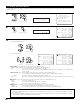
Select “AC Outlet Assign” at the Option Setup
Menu.
2
Display the AC Outlet Assign screen.
AC Outlet 1
AC Outlet 2
AC Outlet 3
Default
Exit
7−5.AC Outlet
Ye s
AC Outlet 1
*AC Outlet
AC Outlet
*Option Setup
CH SEL
ENTER
(Main unit) (Remote control unit)
CH SEL
ENTER
(Main unit) (Remote control unit)
3
Select the AC outlet you want to set.
Switch to the setting screen.
ZONE : MAIN
*AC Outlet 1
7−5.AC Outlet 1
ZONE: MAIN
: :
: :
: :
: :
: :
: :
Tuner DBS
VCR-1
VCR-2
VCR-3
VCR-4
V.Aux
Phono
CD
Tape
DVD
VDP
TV
ON
ON
ON
ON
ON
ON
ON
ON
ON
ON
ON
ON
ON
Example: When “AC Outlet 1” is selected
4
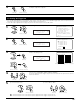
Select the Zone. (MAIN ZONE, ZONE2, ZONE3 and ZONE4)
The power of the AC outlet turns on and off when the power for the set zone is turned on and
off.
CH SEL
ENTER
(Main unit) (Remote control unit)
(Main unit)
CH SEL
ENTER
(Remote control unit)
CH SEL
ENTER
(Main unit)
(Remote control unit)
5
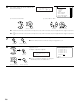
q Select the input source. w Select “ON” or “OFF”.
ON : The power of the AC outlet turns on when that input source is selected.
OFF : The power of the AC outlet turns off when that input source is selected.
CH SEL
ENTER
(Main unit) (Remote control unit)
CH SEL
ENTER
(Main unit) (Remote control unit)
6
Press the ENTER button to return to the AC Outlet Assign screen.
Use the same procedure to make the settings for AC Outlet 2, 3.
CH SEL
ENTER
(Main unit) (Remote control unit)