
User's Guide





98
4
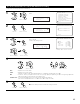
Enter the setting.
The Option Setup Menu reappears.
CH SEL
ENTER
(Main unit) (Remote control unit)
1
1.Channel Setup
2.Power Amp Assign
3.Volume Control
4.Trigger Out
5.AC Outlet Assign
6.Setup Memory/Lock
Exit
7.Option Setup
Select “Channel Setup” at the Option Setup Menu.
2
Display the Channel Setup screen.
7−1.Channel Setup
Main Zone
Main 9.1CH
Subwoofer
1SP
Zone2 5.1CH
Zone3 Stereo
Zone4 Stereo
Main : 9.1CH
*Channel Setup
Channel Setup
*Option Setup
CH SEL
ENTER
(Main unit) (Remote control unit)
CH SEL
ENTER
(Main unit) (Remote control unit)
3
q Select the Zone. w Select the channel setting.
Also select the number of subwoofers
and the output composition to be used in
the Main zone.
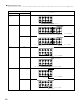
Refer to the table on page 99.
CH SEL
ENTER
(Main unit) (Remote control unit)
CH SEL
ENTER
(Main unit) (Remote control unit)
7−1.Channel Setup
Main Zone
Main 9.1CH
Subwoofer
3SP
Zone2 Stereo
Zone3 Stereo
Zone4 Stereo
L/R/LFE