
User's Guide





96
6
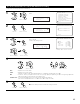
Select “Exit” then press the ENTER button.
The Zone Setup Menu reappears.
(Main unit)
CH SEL
ENTER
(Remote control unit)
CH SEL
ENTER
(Main unit)
(Remote control unit)
Exit
*Zone3/4
6−7.Zone3/4 Tone/Ch Lev.
Zone3 Tone/Ch Lev.
Zone4 Tone/Ch Lev.
Exit
7
Select “Exit” and press the ENTER button at Zone
Setup Menu screen.
The System Setup Menu reappears.
(Main unit)
CH SEL
ENTER
(Remote control unit)
CH SEL
ENTER
(Main unit)
(Remote control unit)
Exit
*Zone Setup
1.Speaker Config.
2.Subwoofer Mode
3.Delay Time
4.Channel Level
5.Crossover Frequency
6.Video Setup
7.Zone3/4 Tone/Ch Lev.
Exit
6.Zone Setup
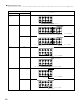
2 “Zone Setup” setting when Zone2 is set to “STEREO” or “MONO”
The “Zone Setup” screen shown below is displayed when “STEREO” or “MONO” is selected for the Zone2 channel setting at “7-1.
Channel Setup”.
Z2 Tone/Ch Lev.
*Zone Setup
6.Zone Setup
1.Zone2 Tone/Ch Lev.
2.Zone3 Tone/Ch Lev.
3.Zone4 Tone/Ch Lev.
4.Video Setup
Exit
• For instructions on making the Zone2, 3 and 4 “Tone/Ch Level” settings (items 1 to 3), see pages 95, 96.
• For instructions on the “Video Setup” (item 4), see pages 93, 94.