
User's Guide





95
6-7. Zone3 and Zone4 tone control and channel level setting
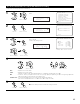
1
Select “Zone3/4 Tone/Ch Lev.” at the Zone Setup
Menu.
• Adjust the sound output from Zone3 and Zone4.
Zone3/4
*Zone Setup
2
Display the Zone3/4 Tone/Ch Lev. screen.
1.Speaker Config.
2.Subwoofer Mode
3.Delay Time
4.Channel Level
5.Crossover Frequency
6.Video Setup
7.Zone3/4 Tone/Ch Lev.
Exit
6.Zone Setup
CH SEL
ENTER
(Main unit) (Remote control unit)
CH SEL
ENTER
(Main unit) (Remote control unit)
3
Select the Zone whose sound you want to adjust.
(Zone3, Zone4)
Switch to the setting screen.
(Main unit)
CH SEL
ENTER
(Remote control unit)
CH SEL
ENTER
(Main unit)
(Remote control unit)
Bass : 0dB
*Z3 Tone/Ch Lev
4
q Select the item to be set. w Adjust the parameter.
Bass : Adjust the tone for the bass.
Treble : Adjust the tone for the treble.
(The bass or treble sound can be adjusted between –12 dB and +12 dB in steps of 2.0 dB.)
HPF : Set this to “ON” if your speakers do not have a very strong capacity for producing low bass. Using the high pass filter
makes it possible to reduce distortion of the bass sound.
Channel Level : Set so that the playback level is the same for the left and right channels.
(The volume can adjusted between –12 dB and +12 dB in steps of 1.0 dB.)
CH SEL
ENTER
(Main unit) (Remote control unit)
CH SEL
ENTER
(Main unit) (Remote control unit)
6−7.Zone3 Tone/Ch Lev.
Bass 0dB
Treble 0dB
HPF OFF
Lch Lev. 0dB
Rch Lev. 0dB
Example: When “Zone3” is selected
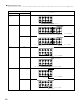
5
Press the ENTER button to return to the Zone3/4 Tone/Ch Lev. screen.
Use the same procedure to make the settings for Zone4.
CH SEL
ENTER
(Main unit) (Remote control unit)
Z3 Tone/Ch Lev.
*Zone3/4
6−7.Zone3/4 Tone/Ch Lev.
Zone3 Tone/Ch Lev.
Zone4 Tone/Ch Lev.
Exit