
User's Guide





94
5
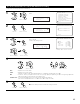
Press the ENTER button to return to the Video Setup screen.
CH SEL
ENTER
(Main unit) (Remote control unit)
[2] Audio Delay (Zone2)
• Set this if it seems there is a delay in the picture on the monitor screen with respect to the sound when watching a DVD or other video
source in the Zone2 listening room. Adjust the audio delay to delay the sound and synchronize the sound and picture.
• The audio delay setting is stored in the memory individually for the different input sources selected at Zone2.
1
Select “Audio Delay” at the Video Setup screen.
6−6.Video Setup
Video Convert Mode
Audio Delay
Exit
Zone-2
Z2 Audio Delay
*Z2 Video Setup
CH SEL
ENTER
(Main unit) (Remote control unit)
2
Display the Audio Delay screen.
6−6.Audio Delay
: 0ms
Zone-2
DVD
Input!Source
0ms
*Z2 Audio Delay
CH SEL
ENTER
(Main unit) (Remote control unit)
3
Set the delay time. (0 ms ~ 200 ms)
With a movie source, for example, adjust so that the movement of the actors’ lips is
synchronized with the sound.
CH SEL
ENTER
(Main unit) (Remote control unit)
4
Press the ENTER button to return to the Video Setup screen.
CH SEL
ENTER
(Main unit) (Remote control unit)
5
Select “Exit”, then press the ENTER button to return
the Zone Setup Menu screen.
6−6.Video Setup
Video Convert Mode
Audio Delay
Exit
Zone-2
Exit
*Z2 Video Setup
(Main unit)
CH SEL
ENTER
(Remote control unit)
CH SEL
ENTER
(Main unit)
(Remote control unit)