
User's Guide





80
5-2. Setting the Dolby Digital Setup
Sets the down-mixing method when not using a center speaker or surround speakers.
OFF: The dynamic range is not compressed.
ON: The dynamic range is compressed automatically according to the combination of speakers being used.
1
Select “Dolby Digital Setup” at the Advanced
Playback Menu.
1.2ch Direct/Stereo
2.Dolby Digital Setup
3.Auto Surround Mode
4.Manual EQ Setup
Exit
5.Advanced Playback
3
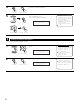
Select “ON” if you want to use the Compression, “OFF” if you do not want to use it.
Downmix Option Setup
Compression
:
5−2.Dolby Digital
ON
OFF
4
Enter the setting.
The Advanced Playback Menu reappears.
NOTE:
When a center speaker or surround speakers are not connected, the sounds in those channels
are directed to the front speakers.
Dolby D Setup
*Advanced Play
Comp. : OFF
*Dolby D Setup
2
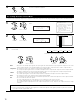
Press the ENTER button.
Display the Dolby Digital Setup screen.
CH SEL
ENTER
(Main unit) (Remote control unit)
CH SEL
ENTER
(Main unit) (Remote control unit)
CH SEL
ENTER
(Main unit) (Remote control unit)
CH SEL
ENTER
(Main unit) (Remote control unit)
Set “Compression” to “ON” if it seems that sound is distorted because the input level
exceeds the allowable input for the front speakers.