
User's Guide





79
5-1. Setting the 2ch Direct/Stereo
• Set this when you want to change the speaker settings when the surround mode is set to the 2-channel Direct or Stereo mode.
1
1.2ch Direct/Stereo
2.Dolby Digital Setup
3.Auto Surround Mode
4.Manual EQ Setup
Exit
5.Advanced Playback
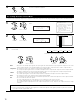
Select “2ch Direct / Stereo” at the Advanced Playback
Menu.
2
Display the 2ch Direct / Stereo screen.
Setting Basic
*2ch DRCT/ST
2ch DRCT/ST
*Advanced Play
CH SEL
ENTER
(Main unit) (Remote control unit)
CH SEL
ENTER
(Main unit) (Remote control unit)
5−1.2ch Direct/Stereo
Crossover : THX
Delay FL : 12.0 ft
FR : 12.0 ft
Example: This screen is displayed in function of the settings made at “2-1. Speaker
Configuration”, “2-2. Subwoofer Setup”, “2-3. Delay Time” and “2-4. Crossover
Frequency”.
5−1.2ch Direct/Stereo
Setting : Basic
Front :
Subwoofer
:
Subwoofer
Mode : −THX−
Ye s
LFE
Small
3
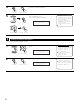
Select “Custom”.
CH SEL
ENTER
(Main unit) (Remote control unit)
5
Enter the setting.
The Advanced Playback Menu reappears.
CH SEL
ENTER
(Main unit) (Remote control unit)
5−1.2ch Direct/Stereo
Setting : Custom
Front :
Subwoofer
:
Subwoofer
Mode : −THX−
Ye s
LFE
Small
Setting Custom
*2ch DRCT/ST
q Select the setting. w Select the parameter.
CH SEL
ENTER
(Main unit) (Remote control unit)
CH SEL
ENTER
(Main unit) (Remote control unit)
4
2 Setting the front B speakers when the surround mode is set to the 2-channel
Direct or Stereo
When “Adv+Front B” is selected at “7-2. Power Amp Assign” and “Custom” is selected at this
setting, the “Front B” setting is displayed.
•To play signals from the Front B speaker when in the 2-channel Direct or Stereo mode, set
“Used”.
5−1.2ch Direct/Stereo
Setting : Custom
Front :
Front B : Used
Subwoofer
:
Subwoofer
Mode :
Ye s
LFE+Main
Large