
User's Guide





78
4
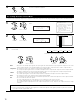
Enter the setting.
The Video Setup Menu reappears.
CH SEL
ENTER
(Main unit) (Remote control unit)
5
1.Component In Assign
2.Video Convert Mode
3.Video Scaler
4.3D Y/C Separation
5.HDMI/DVI In Assign
6.Audio Delay
7.On Screen Display
Exit
4.Video Setup
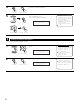
Select “Exit” and press the ENTER button at the
Video Setup Menu screen.
The System Setup Menu reappears.
Exit
*Video Setup
(Main unit)
CH SEL
ENTER
(Remote control unit)
CH SEL
ENTER
(Main unit)
(Remote control unit)
Setting the Advanced Playback
1
2
Select “Advanced Play back” at the System Setup
Menu.
Display the Advanced Playback Menu screen.
1.Auto Setup/Room EQ
2.Speaker Setup
3.Audio Input Setup
4.Video Setup
5.Advanced Playback
6.Zone Setup
7.Option Setup
Exit
System Setup Menu
Advanced Play
*System Setup
1.2ch Direct/Stereo
2.Dolby Digital Setup
3.Auto Surround Mode
4.Manual EQ Setup
Exit
5.Advanced Playback
5
• Makes more detailed audio playback settings.
CH SEL
ENTER
(Main unit) (Remote control unit)
CH SEL
ENTER
(Main unit) (Remote control unit)
2ch DRCT/ST
*Advanced Play