
User's Guide





76
7
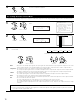
Enter the setting.
The Video Setup Menu reappears.
CH SEL
ENTER
(Main unit) (Remote control unit)
Select the method for playing the audio signals
included in the HDMI input signal.
Select “TV” or “AMP”.
AMP : The audio signals are played according
to the AVR-5805’s speaker systems.
TV : The audio signals are played according
to the number of playable channels on
the monitor TV connected to the AVR-
5805’s HDMI monitor output terminal.
(Main unit)
CH SEL
ENTER
(Remote control unit)
CH SEL
ENTER
(Main unit)
(Remote control unit)
5
4−5.HDMI/DVI In Assign
: HDMI2
: HDMI3 HDMI
: DVI−D : AMP
: NONE No Signal
: NONE 1: EXT−1
: NONE 2: EXT−2
: NONE 3: ANALOG
: NONE
: HDMI1 : HDMI
DVD
VDP
TV
DBS
VCR-1
VCR-2
VCR-3
VCR-4
Monitor
Audio
V.Aux
Audio : AMP
*HDMI/DVI In
Select the input for the playback of signals when
the audio signal of HDMI can not be reproduced.
When the audio signal of HDMI has become
unlocked, the unit automatically changes over to
the set connector (ANALOG or EXT. IN).
1~3 correspond to each HDMI 1~3 input terminal.
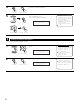
Select input signal (ANALOG or EXT. IN).
(Main unit)
CH SEL
ENTER
(Remote control unit)
CH SEL
ENTER
(Main unit)
(Remote control unit)
6
4−5.HDMI/DVI In Assign
: HDMI2
: HDMI3 HDMI
: DVI−D : AMP
: NONE No Signal
: NONE 1: ANALOG
: NONE 2: EXT−2
: NONE 3: ANALOG
: NONE
: HDMI1 : HDMI
DVD
VDP
TV
DBS
VCR-1
VCR-2
VCR-3
VCR-4
Monitor
Audio
V.Aux
1: ANALOG
*HDMI/DVI In
4-6. Setting the Audio Delay
• When watching a DVD or other video source, the picture on the monitor may seem delayed with respect to the sound. In this case, adjust the
audio delay to delay the sound and synchronize it with the picture.
• The audio delay setting is stored separately for each input source.
1
1.Component In Assign
2.Video Convert Mode
3.Video Scaler
4.3D Y/C Separation
5.HDMI/DVI In Assign
6.Audio Delay
7.On Screen Display
Exit
4.Video Setup
Select “Audio Delay” at the Video Setup Menu.
2
Display the Audio Delay screen.
: 0ms
4−6.Audio Delay
DVD
Input!Source
0ms
*Audio Delay
Audio Delay
*Video Setup
CH SEL
ENTER
(Main unit) (Remote control unit)
CH SEL
ENTER
(Main unit) (Remote control unit)
NOTE:
• If a monitor is connected with an HDMI cable
but the monitor is not compatible with HDMI
audio signal playback, only the video signals
are output to the monitor from the AVR-5805
(DVI mode).
Use the STATUS button to check which
mode is set for outputting HDMI signals
from the AVR-5805 (HDMI and DVI modes).