
User's Guide





72
4
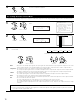
Enter the setting.
The Video Setup Menu reappears.
CH SEL
ENTER
(Main unit) (Remote control unit)
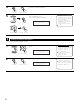
1
Select “Video Convert Mode” at the Video Setup
Menu.
1.Component In Assign
2.Video Convert Mode
3.Video Scaler
4.3D Y/C Separation
5.HDMI/DVI In Assign
6.Audio Delay
7.On Screen Display
Exit
4.Video Setup
2
Display the Video Convert Mode screen.
4−2.Video Convert Mode
:
AUTO
: AUTO
: AUTO
: AUTO
: AUTO
: AUTO
: AUTO
: AUTO
: AUTO
DVD
V.Aux
VDP
TV
DBS
VCR-1
VCR-2
VCR-3
VCR-4
4-2. Setting the Video Convert Mode
Video Mode
*Video Setup
DVD : Auto
*Video Mode
3
q Select the input source for which you want to set the Video
Convert Mode.
w Select the mode as below.
AUTO : When there are multiple input signals, the input signals are detected and the input signal to be output from the video
monitor output terminal is selected automatically in the following order: component video, S-Video, composite video.
Component : The signal connected to the component video terminal is always played.
The component input signal is down–converted and output from the composite and component monitor output terminal.
No image is output from the monitor output terminal when there is no input signal to the component input terminal.
S-Video : The signal connected to the S-Video terminal is always played.
The S-Video input signal is converted and output from the composite and component monitor output terminal.
Video : The signal connected to the composite video terminal is always played.
The composite video input signal is up-converted and output from the S-Video and component monitor output terminals.
OFF : The convert function does not operate.
The video signal input from the video input jack is only output to the video monitor out jack.
The S-Video signal input from the S-Video input jack is only output to the S-Video monitor out jack.
The component input signal input from the component input jacks is only output to the component monitor output
terminals.
AUTO
Component
S-video Video OFF
The details in each mode are as follows.
• Select the input signal to be output to the composite S-Video and component monitor output terminals using the video conversion function.
CH SEL
ENTER
(Main unit) (Remote control unit)
CH SEL
ENTER
(Main unit) (Remote control unit)
CH SEL
ENTER
(Main unit) (Remote control unit)
CH SEL
ENTER
(Main unit) (Remote control unit)
NOTE:
• Down-converting from the component video signal to the S-Video and composite video signal is possible only when the resolution
of a component video signal is 480i / 576i.