
User's Guide





71
Setting the Video Setup
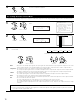
1
2
Select “Video Setup” at the System Setup Menu.
Display the Video Setup Menu screen.
1.Auto Setup/Room EQ
2.Speaker Setup
3.Audio Input Setup
4.Video Setup
5.Advanced Playback
6.Zone Setup
7.Option Setup
Exit
System Setup Menu
Video Setup
*System Setup
1.Component In Assign
2.Video Convert Mode
3.Video Scaler
4.3D Y/C Separation
5.HDMI/DVI In Assign
6.Audio Delay
7.On Screen Display
Exit
4.Video Setup
4
• Make the video-related settings.
CH SEL
ENTER
(Main unit) (Remote control unit)
CH SEL
ENTER
(Main unit) (Remote control unit)
4-1. Setting the Component In Assign
• This setting assigns the component video input terminal of the AVR-5805 for the different input sources.
1
1.Component In Assign
2.Video Convert Mode
3.Video Scaler
4.3D Y/C Separation
5.HDMI/DVI In Assign
6.Audio Delay
7.On Screen Display
Exit
4.Video Setup
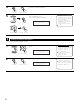
Select “Component In Assign” at the Video Setup
Menu.
2
Display the Component In Assign screen.
4−1.Component In Assign
: 2−RCA : NONE
: 3−RCA : NONE
: 4−RCA
: 5−RCA
: 6−BNC
Default
:
1−RCA : NONE
Ye s
DVD
VCR-3
VCR-4
V.Aux
VDP
TV
DBS
VCR-1
VCR-2
DVD : 1RCA
*Component In
Component In
*Video Setup
CH SEL
ENTER
(Main unit) (Remote control unit)
CH SEL
ENTER
(Main unit) (Remote control unit)
3
Select the component (Y, PB/CB and PR/CR) video input terminal to be assigned to the input source.
Select from among 1-RCA to 5-RCA and 6-BNC.
Select “NONE” for input sources for which the component (Y, PB/CB and PR/CR) video input is not to be used.
It is not possible to select the same component video input jack for different sources.
If the same component video input jack is selected, the setting for the input source that was previously assigned switches to “NONE”.
If “Yes” is selected for “Default”, the settings are reset to the default values.
q Select the input source. w Select the component video input terminal.
CH SEL
ENTER
(Main unit) (Remote control unit)
CH SEL
ENTER
(Main unit) (Remote control unit)
Component In
*Video Setup