
User's Guide




66
3-6. Setting the IEEE1394 Auto Function
• Set whether or not to automatically play the IEEE1394 device when it is selected with the FUNCTION knob.
1
2
1.Digital In Assign
2.EXT.IN Setup
3.Input Function Lev.
4.Function Rename
5.IEEE1394 Assign
6.IEEE1394 Auto Func.
7.Tuner Presets
Exit
3.Audio Input Setup
3−6.IEEE1394 Auto Func.
Auto Function
OFF
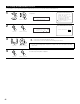
Select “IEEE1394 Auto Func.” at the Audio Input
Setup Menu.
Display the IEEE1394 Auto Function screen.
IEEE1394 Auto
*Audio In Setup
Auto Func: OFF
*IEEE1394 Auto
Select “ON” or “OFF”.
ON : Select this to automatically play the device.
OFF : Select this if you do not want to automatically play the device.
3
NOTE:
• In some cases settings may be required on your player. Also refer to the player’s operating
instructions.
4
Enter the setting.
The Audio Input Setup Menu reappears.
CH SEL
ENTER
(Main unit) (Remote control unit)
CH SEL
ENTER
(Main unit) (Remote control unit)
CH SEL
ENTER
(Main unit) (Remote control unit)
CH SEL
ENTER
(Main unit) (Remote control unit)