
User's Guide





49
2-3. Setting the Delay Time
1.Speaker Config.
2.Subwoofer Setup
3.Delay Time
4.Channel Level
5.Crossover Frequency
6.Surround Sp Setup
7.THX Audio Setup
Exit
2.Speaker Setup
1
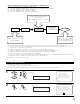
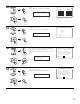
Select “Delay Time” at the Speaker Setup Menu.
2−3.Delay Time
Set The Distance To
Each Speakers
Do You Prefer
In Meters? / In Feet?
Meters : Feet
2−3.Delay Time
Set The Distance To
Each Speakers
Do You Prefer
In Meters? / In Feet?
Meters :
Feet
2
3
4
5
Display the Delay Time screen.
Select the desired unit, meters or feet.
Once “Meters” or “Feet” is selected in step 3, the
Delay Time screen appears automatically.
Select the speaker to be set.
The picture of the speaker selected blinks.
Example: When “Feet” is selected
2−3.Delay Time
SL A 10.0
ft
SR A 10.0
ft
SL B 10.0
ft
SR B 10.0
ft
SBL 10.0
ft
SBR 10.0
ft
2−3.Delay Time
Step 1
ft
Default
FL 12.0
ft
FR 12.0
ft
C 12.0
ft
SW 12.0
ft
Ye s
CH SEL
ENTER
(Main unit) (Remote control unit)
CH SEL
ENTER
(Main unit) (Remote control unit)
CH SEL
ENTER
(Main unit) (Remote control unit)
CH SEL
ENTER
(Main unit) (Remote control unit)
Delay Time
*Speaker Setup
Meters : Feet
*Delay Time
FL : 12.0ft
*Delay Time
• Input the distance between the listening position and the different speakers to set the delay time for the surround mode.
•Two surround back speakers are required to use the THX Ultra2 Cinema, THX Music modes and THX Games mode.
Set the surround back speakers so that the distance to the listening position is the same for both the left and right speakers.
It is also recommended that the deviations of the distance from the listening position to L and R channel speakers (front left (FL) and front right
(FR), surround left (SL) and surround right (SR), surround back left (SBL) and surround back right (SBR)) is less than 2 ft (60 cm).
Preparations:
Measure the distances between the listening position and the speakers (L1 to L6 on the diagram at
the right).
L1: Distance between center speaker and listening position
L2: Distance between front speakers and listening position
L3: Distance between surround speakers and listening position
L4: Distance between surround back speakers and listening position
L5: Distance between subwoofer and listening position
L6: Distance between surround back L and surround back R
L1
L2
L5
L3
L6
L4
Center FRFL
Subwoofer
SL
Listening position
SR
SBRSBL