
User's Guide





45
10
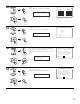
If the check ends, select “Exit” and press the ENTER
button.
The EQ Parameter Check screen reappears.
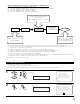
EQ Check
−Audyssey− Next
Exit
SurroundBack
L
SurroundBack
R
63
125
250
500
1k
2k
4k
8k
16k
−20
−
6
0
+
6
63
125
250
500
1k
2k
4k
8k
16k
−20
−
6
0
+
6
Exit
EQ Chk Audyssey
11
Select “Exit” and press the ENTER button at the EQ
Parameter Check screen.
The Parameter Check screen reappears.
1−5.EQ Parameter Check
Audyssey
Front
Flat
Exit
Exit
*EQ Check
(Main unit)
CH SEL
ENTER
(Remote control unit)
CH SEL
ENTER
(Main unit)
(Remote control unit)
12
The results of the “Auto Setup” procedure can be
reset even if the settings have been changed after
performing the “Auto Setup” procedure.
Select “Restore Yes 0” then press the Cursor left
button.
Speaker Config.Check
Delay Time Check
Channel Level Check
Crossover Freq.Check
EQ Parameter Check
Exit
1−5.Parameter Check
Restore
Ye s
Restore
*ParameterCheck
13
Select “Exit” and press the ENTER button at the
Parameter Check screen.
The Auto Setup / Room EQ Menu reappears.
Speaker Config.Check
Delay Time Check
Channel Level Check
Crossover Freq.Check
EQ Parameter Check
Exit
1−5.Parameter Check
Restore
Ye s
Exit
*ParameterCheck
(Main unit)
CH SEL
ENTER
(Remote control unit)
CH SEL
ENTER
(Main unit)
(Remote control unit)
(Main unit)
CH SEL
ENTER
(Remote control unit)
CH SEL
ENTER
(Main unit)
(Remote control unit)
(Main unit)
CH SEL
ENTER
(Remote control unit)
CH SEL
ENTER
(Main unit)
(Remote control unit)