
User's Guide





44
3
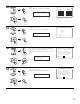
Select the items.
CH SEL
ENTER
(Main unit) (Remote control unit)
4
Press the ENTER button and display the verification screen.
For instructions on checking the results of each item, see page 38.
CH SEL
ENTER
(Main unit) (Remote control unit)
5
EQ parameters can be checked here.
Select “EQ Parameter Check” at the Parameter
Check screen.
CH SEL
ENTER
(Main unit) (Remote control unit)
6
Display the EQ Parameter Check screen.
CH SEL
ENTER
(Main unit) (Remote control unit)
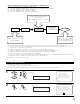
1−5.EQ Parameter Check
Audyssey
Front
Flat
Exit
Speaker Config.Check
Delay Time Check
Channel Level Check
Crossover Freq.Check
EQ Parameter Check
Exit
1−5.Parameter Check
Restore
Ye s
EQ Check
*ParameterCheck
Audyssey
*EQ Check
7
Select the Equalizer curve.
CH SEL
ENTER
(Main unit) (Remote control unit)
EQ Check
−Audyssey− Next
Exit
Front L Front R
63
125
250
500
1k
2k
4k
8k
16k
−20
−
6
0
+
6
63
125
250
500
1k
2k
4k
8k
16k
−20
−
6
0
+
6
8
Display the parameter screen.
The display is only an approximate picture of the
response and that correction is happening at all
frequencies.
9
CH SEL
ENTER
(Main unit) (Remote control unit)
Select the speaker channel.
CH SEL
ENTER
(Main unit) (Remote control unit)
FL/FR :Next
EQ Chk Audyssey