
User's Guide





43
Micr
ophone Amplifier Gain Setting using Sound Level Meter and RMS Volt Meter
First you will need to adjust the “ microphone amplifier gain”.
(1) Connect the all speakers and the video monitor (for the on-screen display) with the AVR-5805
(2) Connect the microphone with the microphone amplifier
(3) Turn on the AVR-5805 and the “microphone amplifier”
(4) Turn on the “Phantom Supply” on the microphone amplifier
(5) Set the Parameter “Test Tone” to “Manual” and “Test Tone Start” to “Yes” at “2-4. Channel Level”. (See pages 51, 52)
(6) Once the test tone for Front Left (FL) speaker starts, check the Sound Pressure Level at the Listening Position with an SPL Meter. You
do not have to check any of the other channels.
(7) Adjust the “Main Volume” so that the Sound Pressure Level measures 80 dB (C-weighted)
(8) Once the “Main Volume” as been set, connect the output of microphone amplifier to the RMS Volt Meter
(9) Adjust the “microphone amplifier’s gain” as the RMS Volt Meter becomes about 120 [mV RMS]
(10) Once set, exit out of “System Setup” and turn off the AVR-5805
(11) Connect the output of the microphone amplifier to the AVR-5805’s front panel “V.AUX” Left channel audio input–located behind Trap Door
(12) Change the setting to “V.AUX L” at “1-4. Mic Input Select”. (See pages 42, 43)
(13) Start “Auto Setup”. (See pages 33~39)
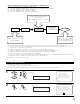
AVR-5805
Speaker Microphone
Use the internal test tones for
mic amp calibration.
Pressure level with SPL meter at the
microphone point.
Adjust AVR volume SPL meter = 80 dB (C)
MIC AMP with mic
power supply ex.
mixer amp.
Measure the output level and
adjust the mic amp gain to 120
mVrms using a RMS volt meter.
120 mVrms
1-5. Check the Parameter
1
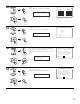
Select “Parameter Check” at the Auto Setup / Room
EQ Menu.
CH SEL
ENTER
(Main unit) (Remote control unit)
• The results of the measured items can be checked.
• The EQ parameters that were set in Auto Setup can be checked.
• This item is automatically displayed, after the measurement result of the “Auto Setup / Room EQ” is decided.
2
Display the Parameter Check screen.
CH SEL
ENTER
(Main unit) (Remote control unit)
1−5.Parameter Check
Delay Time Check
Speaker Config.Check
Channel Level Check
Crossover Freq.Check
EQ Parameter Check
Restore
Exit
Ye s
1.Auto Setup
2.Room EQ Setup
3.Direct Mode Setup
4.Mic Input Select
5.Parameter Check
Exit
1.Auto Setup/Room EQ
Parameter Check
*AutoSet/RoomEQ
Sp Config.Check
*ParameterCheck