
User's Guide





41
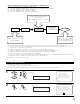
1-3. Setting the Direct Mode
1.Auto Setup
2.Room EQ Setup
3.Direct Mode Setup
4.Mic Input Select
5.Parameter Check
Exit
1.Auto Setup/Room EQ
1
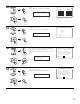
Select “Direct Mode Setup” at the Auto Setup /
Room EQ Menu.
CH SEL
ENTER
(Main unit) (Remote control unit)
Direct Mode
*AutoSet/RoomEQ
• Perform the ON/OFF setting of Room EQ when the surround mode is Direct or Pure Direct.
2
Display the Direct Mode Setup screen.
CH SEL
ENTER
(Main unit) (Remote control unit)
1−3.Direct Mode Setup
DIRECT/PURE DIRECT
Room EQ :
ON
OFF
3
Select ON or OFF.
CH SEL
ENTER
(Main unit) (Remote control unit)
4
Enter the setting .
The Auto Setup / Room EQ Menu reappears.
CH SEL
ENTER
(Main unit) (Remote control unit)
Room EQ: OFF
*Direct Mode
5
Enter the setting.
The Auto Setup / Room EQ Menu reappears.
CH SEL
ENTER
(Main unit) (Remote control unit)