
User's Guide




40
1.Auto Setup
2.Room EQ Setup
3.Direct Mode Setup
4.Mic Input Select
5.Parameter Check
Exit
1.Auto Setup/Room EQ
1
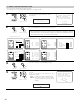
Select “Room EQ Setup” at the Auto Setup / Room
EQ Menu.
CH SEL
ENTER
(Main unit) (Remote control unit)
Room EQ Setup
*AutoSet/RoomEQ
• Select the setting of an Equalizer that has been set with Auto Setup or Manual EQ.
2
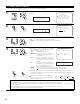
q When the “All” is selected and press the ENTER
button, display the Select the EQ Curve screen.
Select the Equalizer setting.
OFF : The Equalizer is not used.
Audyssey : Adjusts the frequency response of
all speakers to correct the effects of
room acoustics.
Front : Adjusts the frequency response of
the surround speakers to match the
characteristics of the front channel
speakers.
Flat : Adjusts the frequency response of
all speakers to the flattest response.
This mode is suitable for multi-channel
music surround sound sources.
Manual : Selects the setting value that was set in the Manual EQ setup.
For details of the “5-4. Manual EQ Setup”, see pages 82~84.
(Main unit) (Remote control unit)
Display the Room EQ Setup screen.
CH SEL
ENTER
(Main unit) (Remote control unit)
SurMode: ALL
*Room EQ Setup
1−2.Room EQ Setup
Relation To
The Surround Mode
ALL : Assign
3
Select All or Assign.
All : Sets the Equalizer for all surround modes.
Assign : Sets the Equalizer individually for each surround mode.
CH SEL
ENTER
(Main unit) (Remote control unit)
4
1−2.Room EQ Setup
Select The EQ Curve
Room EQ Audyssey
EQ : Audyssey
*Room EQ Setup
OFF Audyssey
FlatManual
Front
NOTES:
• The Equalizer setting of “Audyssey”, “Flat” and “Front” can be selected after performing the Auto Setup.
• When the speaker set as “None” with the Auto Setup is changed to on manually, the equalizer of “Audyssey”, “Front” and “Flat”
cannot be used.
• The Equalizer setting can be selected directly by ROOM EQ button on the Main unit or Remote control unit.
• When headphones are connected, the Room EQ cannot be used.
w If “Assign” is selected, select the desired equalizer setting using the ROOM EQ buttons on
the Main unit or Remote control unit. Equalizer settings for the individual surround modes can
be stored in the memory.
1-2. Setting the Room EQ Setup
CH SEL
ENTER
(Main unit) (Remote control unit)
Whenever the ROOM EQ button on Main unit or
Remote control unit is pressed, the display
switches as shown below.