
User's Guide




38
V
. Check of the measurement result
• The results of the measured items can be checked.
For instructions on checking the equalizer parameters, see pages 43~45.
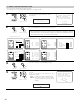
1−1.Auto Setup
Speaker Config.Check
Channel Level Check
Crossover Freq.Check
Delay Time Check
Cancel
Store
1
Select the items.
The measurement results of each item can be
checked here.
Sp Config.Check
*Auto Setup
CH SEL
ENTER
(Main unit) (Remote control unit)
2
Press the ENTER button and display the verification screen.
Press the ENTER button to switch to the second screen.
CH SEL
ENTER
(Main unit) (Remote control unit)
Delay Time Check
FL 12.0
ft
FR 12.0
ft
C 12.0
ft
SW 12.0
ft
[Delay Time Check]
NOTE:
• When measurements have been made using the measurement microphone, speakers
with a built-in filter such as subwoofers might be set with a value that differs from the
physical distance because of the internal electrical delay.
Channel Level Check
FL 0.0
dB
FR 0.0
dB
Center 0.0
dB
Subwoofer
0.0
dB
[Channel Level Check]
Speaker Config.Check
Front Sp.
Center Sp.
Subwoofer
Ye s
No
Large Small
Small None
[Speaker Config. Check]
Delay Time Check
SL A 10.0
ft
SR A 10.0
ft
SL B 10.0
ft
SR B 10.0
ft
SBL 10.0
ft
SBR 10.0
ft
Channel Level Check
SL A 0.0
dB
SR A 0.0
dB
SL B 0.0
dB
SR B 0.0
dB
SBL 0.0
dB
SBR 0.0
dB
Speaker Config.Check
Surround
Sp.A
Sp.B
Sp.Back
Small None
Small
2spkrs 1spkr
None
Small None
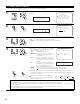
3
If the check ends, press the ENTER button again.
CH SEL
ENTER
(Main unit) (Remote control unit)
1−1.Auto Setup
Cancel
Store
Speaker Config.Check
Channel Level Check
Crossover Freq.Check
Delay Time Check
4
Select whether or not to save the data you have
checked.
Select the following items based on the
measurement results.
Store : Set with the checked measurement value.
Cancel : If you do not want to set the contents
you have checked, cancel the auto setup
settings.
Store
*Auto Setup
CH SEL
ENTER
(Main unit) (Remote control unit)
Crossover Freq.Check
Front : 80㎐
Center : 80㎐
Surround A : 80㎐
Surround B : 80㎐
S.Back : 80㎐
Small
Small
Small
Small
Small
[Crossover Freq. Check]