
User's Guide




35
III
. Preliminary measurements
• This procedure is used to automatically determine the background noise, whether or not speakers are connected, and the polarities of the
connected speakers.
1−1.Auto Setup
at ear height at
Please place microphone
main listening position.
Cancel
Start
Channel:9.1CH
Extra Setup
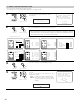
1
Select the “Start” and press the Cursor left
button.
Start the preliminary measurements.
Start
*Auto Setup
2
The screen shown at the right appears once the
preliminary measurements are completed.
Press the ENTER button to switch the Speaker
Detect Check screen.
1−1.Auto Setup
at ear height at
Please place microphone
main listening position.
Speaker Detect Check
Cancel
Retry
OK Start
Sp Detect Check
Cautions when making the measurements:
• It is not possible to measure properly if there are any obstacles between the speakers
and microphone. Check that there are no obstacles.
• Please do not stand between or near the speakers and the microphone during the
measurements.
•To avoid affecting the measurements, turn off the air-conditioner or any other device that
makes noise and take the measurements with the room as quiet as possible.
•Measurement is canceled when MASTER VOLUME is operated while the Auto Setup is
performed.
(Main unit)
CH SEL
ENTER
(Remote control unit)
CH SEL
ENTER
(Main unit)
(Remote control unit)
CH SEL
ENTER
(Main unit) (Remote control unit)
3
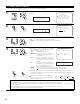
Check the results of the speaker detection.
Press the ENTER button to switch to the second screen.
If the check ends, press the ENTER button again.
CH SEL
ENTER
(Main unit) (Remote control unit)
Speaker Detect Check
Surround
Sp.A
Sp.B
Sp.Back
2spkrs 1spkr
Ye s
No
Ye s
No
Ye s
No
Speaker Detect Check
Front Sp.
Center Sp.
Subwoofer
Ye s
No
Ye s
No
Ye s
No
[First screen] [Second screen]
NOTE:
• Subsequent measurements will be made based on this data, so be sure to check the results of these measurements.
If the results are not as expected or if an error message is displayed, select “Retry” and perform the measurements again. (For
details on the error messages, see page 39.)
If the results of remeasurement are still not as expected or if an error message is displayed, turn off the power switch and check
the speaker connections. Then start the measurements again from the beginning.
1−1.Auto Setup
Measuring
Speaker Detect
Cancel